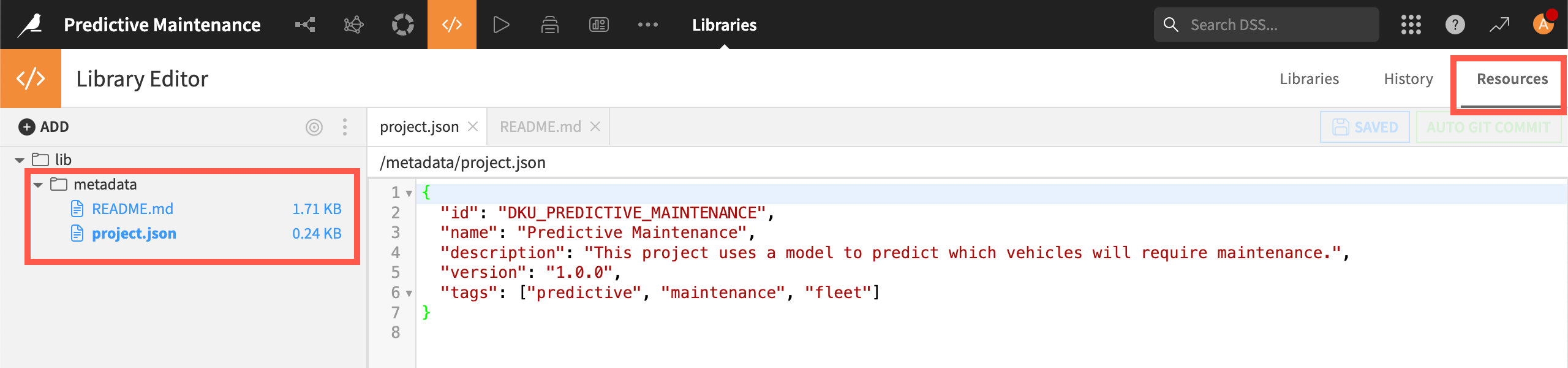

How-to | Add metadata to a project for sharing#
Users who want to share a project might want to add metadata that helps other users understand the project.
The metadata will be attached to the project when it’s downloaded as a zip file and shared with other users directly or via the Enterprise Asset Library.
To add project metadata:
Go to the Code menu (
 ) > Libraries > Resources tab.
Right-click on the lib folder and create a folder called
metadata.Create a file named
project.jsonin the folder.Copy and paste this JSON template into the file editor:
{
   "id": "PROJECT_ID",
   "name": "project name",
   "description": "project description",
   "version": "1.0.0",
   "tags": ["tag1", "tag2", "tag3"]
}
Replace the dummy text on each line with your project’s information.
Optionally, create another file in the metadata folder called
README.mdand add a richer description in Markdown.Click Save All.