

Concept | Geo join recipe#
The Geo join recipe is a visual recipe that joins two or more datasets using geographic features that meet certain criteria, such as points within a specific distance, features that intersect, or points within a specific geography.
See also
This recipe is similar to but has more functionality than the Geo-join processor, which can only perform a geographic nearest-neighbor join between two datasets with latitude and longitude coordinates.
Geographic data models#
Geographic data can be represented using two main models:
Vector data, which represents space using discrete geometries.
Raster data, which represents space as a grid of cells (pixels).
For raster data, you’ll want to review Dataiku’s resources for working with code, such as the Developer Guide. On the other hand, for vector data, Dataiku offers a number of visual tools. Within the vector model, you’ll encounter a few types of geometries:
Geometry |
Examples |
|---|---|
Points |
Addresses, GPS coordinates |
Linestrings |
Roads, rivers, power lines |
Polygons |
Administrative boundaries, buffer areas around a point, flood zones |
“Multi”-versions |
Collections of points, lines, polygons or geometries |
Important
Geospatial operations on vector data in Dataiku require specific storage types. From the Explore tab of any dataset, open the storage type dropdown of a column, and review the Geospatial options. Most often, you’ll be working with GeoPoint or Geometry types. See geometry storage types in the reference documentation to learn more.
Use cases for joining vector data#
Vector data often sparks questions like: What’s nearby? What’s inside? What overlaps? What intersects? To give a few examples:
What’s the nearest store (a point) to a customer (another point)?
How many customers (points) are within some area (a polygon) of a store (another point)?
What districts (polygons) does a new power line (a linestring) cross?
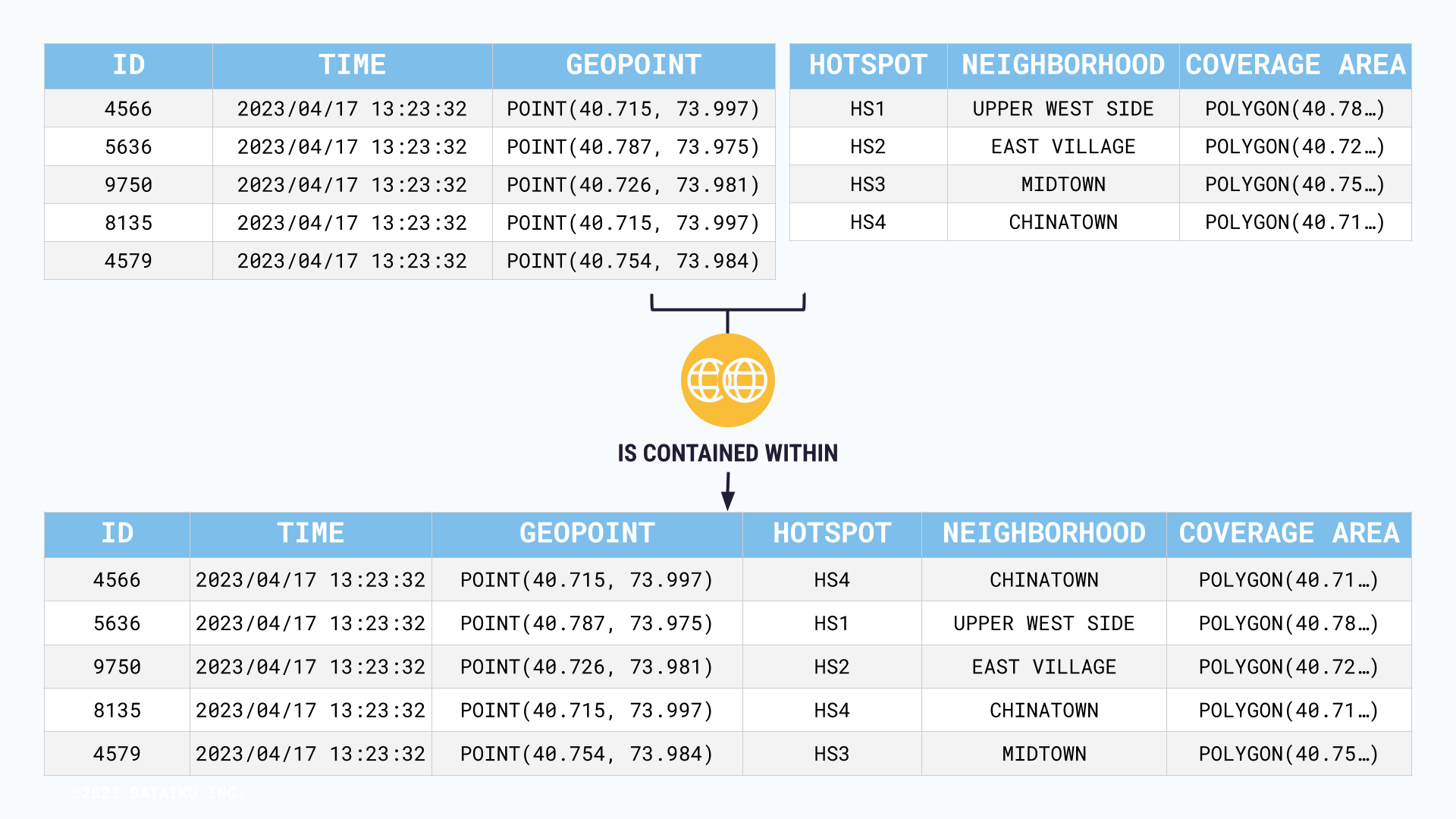
To give one more example, imagine optimizing the use of different city WiFi hotspots. You might want to combine two datasets:
One containing the coverage areas of different hotspots (polygons surrounding a center point).
Another dataset containing foot traffic (points).
The Geo join recipe enables you to find the foot traffic points (coordinates) contained within the hotspot coverage zones.
Geospatial matching operators#
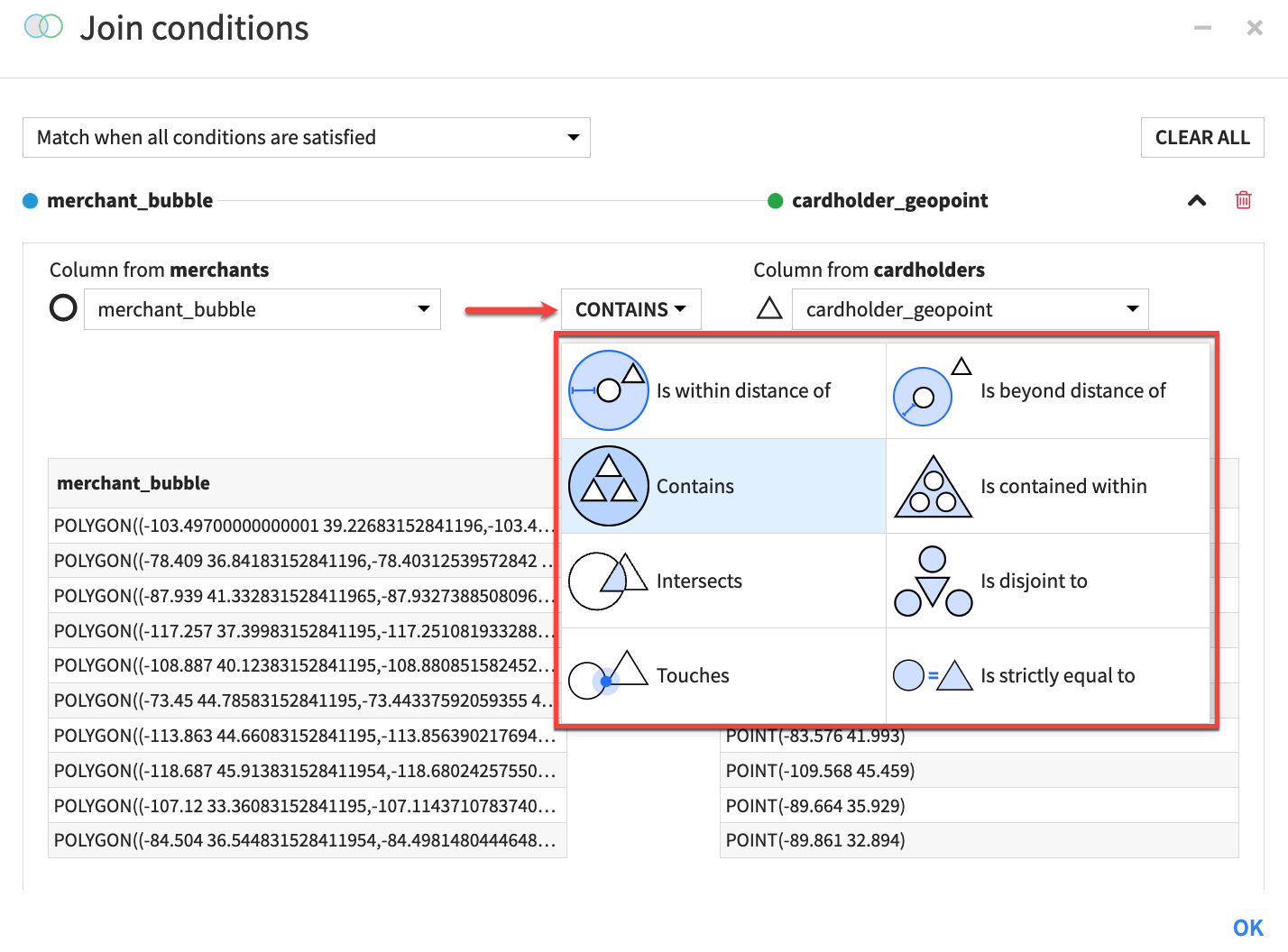
It’s impossible to answer these kinds of spatial questions with the typical comparison operators in the Join recipe, such as =, >, and <. Instead, the Geo join recipe includes a variety of matching operators to combine datasets based on spatial relationships.
For many geospatial operations, the exact operator depends on the assignment of the left and right datasets. Accordingly, you’ll find inverse operators. In the use case above, the geospatial matching operator is about containment. Depending on whether the left dataset is the foot traffic or the WiFi hotspots, you might either:
Match the users contained within WiFi zones.
Match the WiFi zones containing users.
See also
You can find the complete list of geospatial matching operators in the reference documentation.
Next steps#
Get some hands-on practice using the Geo join recipe with the Tutorial | Geo join recipe!
Tip
You can find this content (and more) by registering for the Dataiku Academy course, Geospatial Analytics. When ready, challenge yourself to earn a certification!
See also
Find detailed information on this recipe in the reference documentation on Geo join: joining datasets based on geospatial features.