

Concept | Project#
Watch the video or read the summary below.
A project is the fundamental unit of work in Dataiku. It defines a bounded space where a data initiative is designed, built, and delivered. It brings together the data, logic, models, and AI components required to address a specific use case, along with the tools used to collaborate and share results.
Why projects matter#
Projects organize data work in Dataiku by structuring the work around a specific use case, bringing all related elements together in one place.
This structure serves several important purposes:
Purpose |
Description |
|---|---|
Clear boundaries |
A project defines the scope of a specific use case or data initiative, preventing unintended interactions between workflows. |
Reproducibility |
Keeping datasets, transformations, models, and outputs together makes workflows easier to understand, reproduce, and maintain over time. |
Collaboration |
Projects provide a shared space where teams can work on the same data problem with a common understanding of its structure. |
Governance |
Projects are a natural level at which to manage access, permissions, and ownership, helping control how data and workflows are used. |
What a project contains#
A project can group many types of components, each playing a different role in the data workflow.
The examples below highlight some of the most common ones, but they’re not exhaustive.
Data and transformation
Datasets, used as inputs (raw source) and outputs (processed data).
Recipes for transforming and preparing the data from these datasets.
Analysis and intelligence
Models that are trained and applied within the project to make analysis or predictions.
Generative AI components, such as prompts, agents, knowledge banks, etc.
Code notebooks for exploratory data analysis and custom logic.
Collaboration and sharing
Discussions and wikis for capturing context, documenting decisions, and coordinating with teammates.
Dashboards to share insights with other stakeholders.
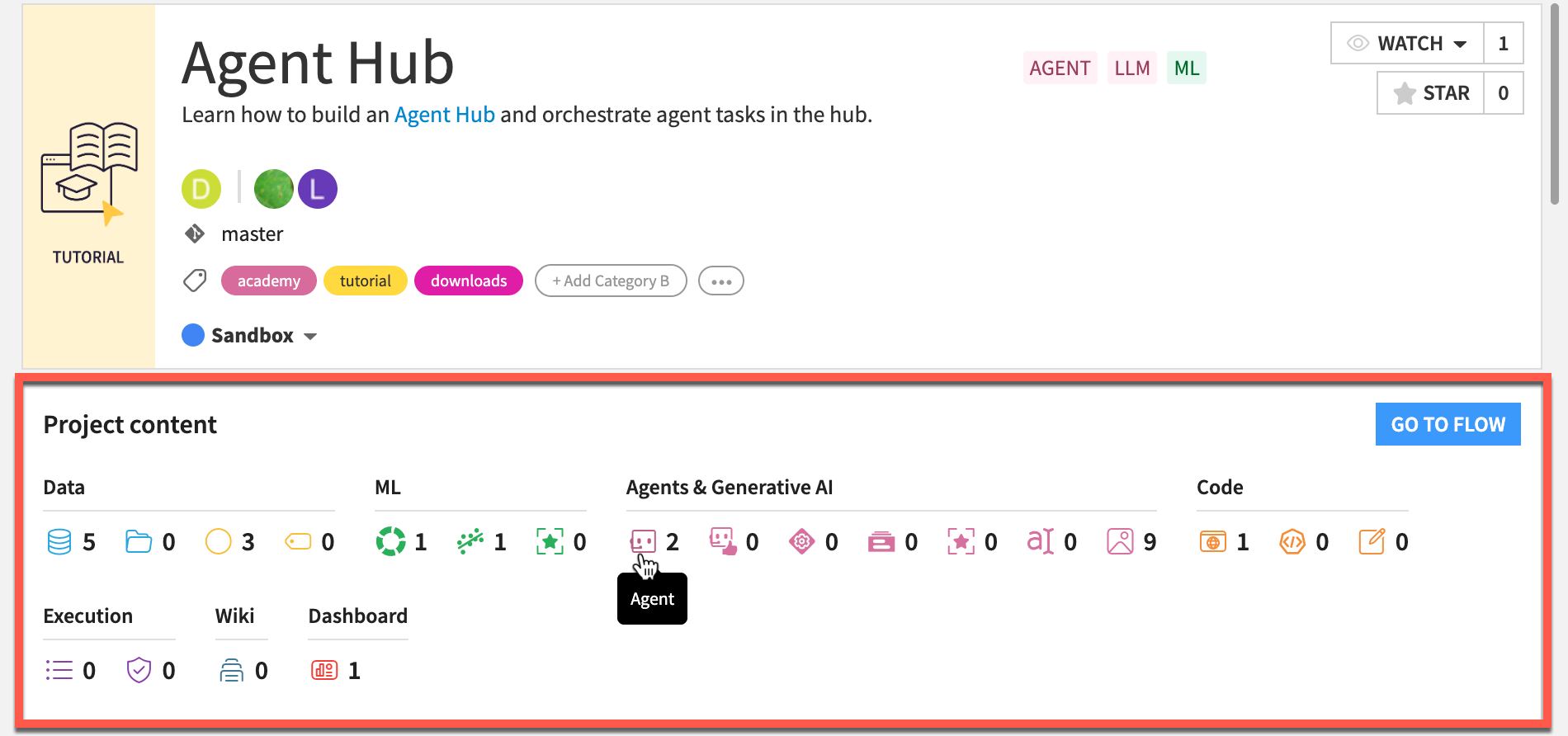
A project can contain many other types of objects such as scenarios, webapps, plugins and more. For a quick overview of everything your project holds, take a look at the Project content section of a project homepage in Dataiku.
Where projects fit in Dataiku#
Projects exist inside a Dataiku instance and can be organized into project folders to keep related work together. Each project contains a Flow, which is the visual canvas that represents how the different objects (datasets, recipes, etc.) are connected into a data pipeline.
The project and its Flow are inseparable: the project is the container for all the work, and the Flow is the map of how that work is structured and executed. The Flow expresses the logic of the project, showing how data moves from sources to outputs through successive transformations and analysis.
The project homepage#
When you open a project, the project homepage gives you an at-a-glance view of its overall status, recent user activity, contributors, and to-do items.
From this space, users may also perform project-level actions such as duplicating, exporting, or deleting the project, depending on their permissions.

Next steps#
In this article, you learned what a Dataiku project is: a space that organizes all the elements of a specific data activity in one place. Continue getting to know the basics of Dataiku by learning about the Dataiku Flow.