

Concept | Extract content recipe#
A large share of business data lives in documents such as PDFs, Word files, presentations, etc. This data is valuable, but it’s unstructured, meaning it can’t be directly queried, aggregated, or easily reused in downstream processes without first being extracted into a usable form.
The Extract Content recipe bridges that gap. When you initiate the recipe, Dataiku prompts you to choose between two distinct tasks:
Task |
Description |
|---|---|
Extract full content |
Extracts the full content from each document into a dataset. |
Extract fields |
Extracts the specific fields you define from each document into a dataset. |
Note
Whatever the method, you can store the documents in a folder in Dataiku or you can connect to an external storage, such as Amazon S3, Azure Blob Storage, Google Cloud Storage, etc. In this case, your administrator must have configured the relevant connection to the external storage in Dataiku beforehand.
Full content extraction#
Full content extraction captures the entire textual content of each document and writes it to a dataset. One document produces one row; the raw text is stored in a single column named extracted_content by default.
When to use it#
You may need this extraction when:
You need the complete text for downstream processing, such as search indexing, topic modeling, summarization, or Retrieval Augmented Generation (RAG).
You don’t have a fixed list of fields to extract, or the documents are too varied to define a single schema.
How it works#
The recipe reads each file and extracts the full text using either a text extraction method or a Vision Language Model. The output dataset contains one row per document, with columns such as:
Column |
Description |
|---|---|
source_file |
Indicates the file path within the input folder. |
extracted_content |
Stores the full extracted text. |
structured_content |
Provides a JSON version of the extraction. |
additional columns |
Provide information such as the page range, extraction engine (text or VLM) or content ID. |
For a step-by-step guide, see How-to | Extract full text content into a dataset.
Field extraction#
Field extraction takes a folder of documents and a list of fields, and produces a structured dataset with one column per field.
How it works#
Field extraction relies on a Vision Language Model. Unlike traditional text extraction, which reads raw characters from a file, a VLM processes each document as an image per page. This allows it to handle complex document layouts (multi-column pages, embedded tables, handwritten annotations, or scanned files) that basic text parsers struggle with.
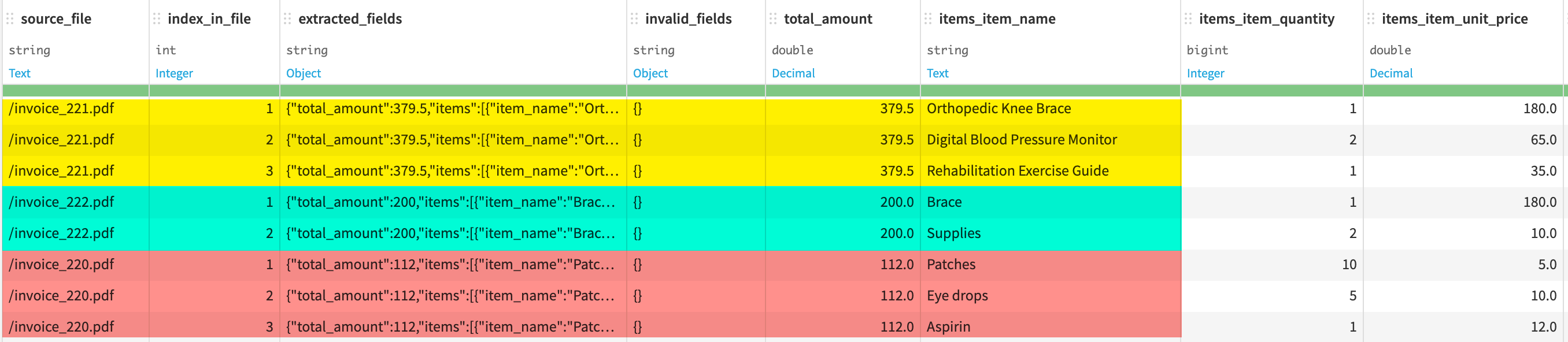
The recipe processes documents one by one. For each document, the VLM reads the page and locates the values that correspond to your schema. The result is a dataset with one row per document and one column per field. You can have several rows for a single document if you define array fields with expansion enabled, such as one row per line item in an invoice (for more information, see From schema to output: How arrays are handled).
Note
The quality of the extraction depends on the quality of the model you choose and the clarity of the field descriptions you provide. A field named total will yield less reliable results than a field named total_amount_including_tax_in_euros. Writing good descriptions is part of using the recipe well.
The role of the VLM#
Any VLM that supports structured output (like OpenAI, Azure OpenAI, or Vertex AI) can power the field extraction recipe. Dataiku automatically leverages these capabilities to improve extraction quality and ensure that values are returned in a consistent format.
The VLM operates within a context limit. If a document is too long to process in a single request, it’s skipped and a warning is raised. Other documents in the folder aren’t affected.
Beyond choosing the model, you can provide an extraction prompt that apply to all documents. This is useful when all documents share common characteristics. For example, they all follow a specific invoice template, and you want to give the model that context upfront.
Defining the extraction schema#
The extraction schema tells the VLM the fields you want to extract from your documents. You define it once, and the recipe applies it consistently to every document.
Each field in the schema has three properties:
Field property |
Description |
|---|---|
Field name |
Sets the column header in the output dataset. |
Type |
Indicates how the extracted value is stored. It can be string, integer, number, date, boolean, or array. Note The |
Description |
Guides the model toward the right value. The more precise the description, the more reliable the extraction. |
For example, to extract data from an invoice, you might define fields like:
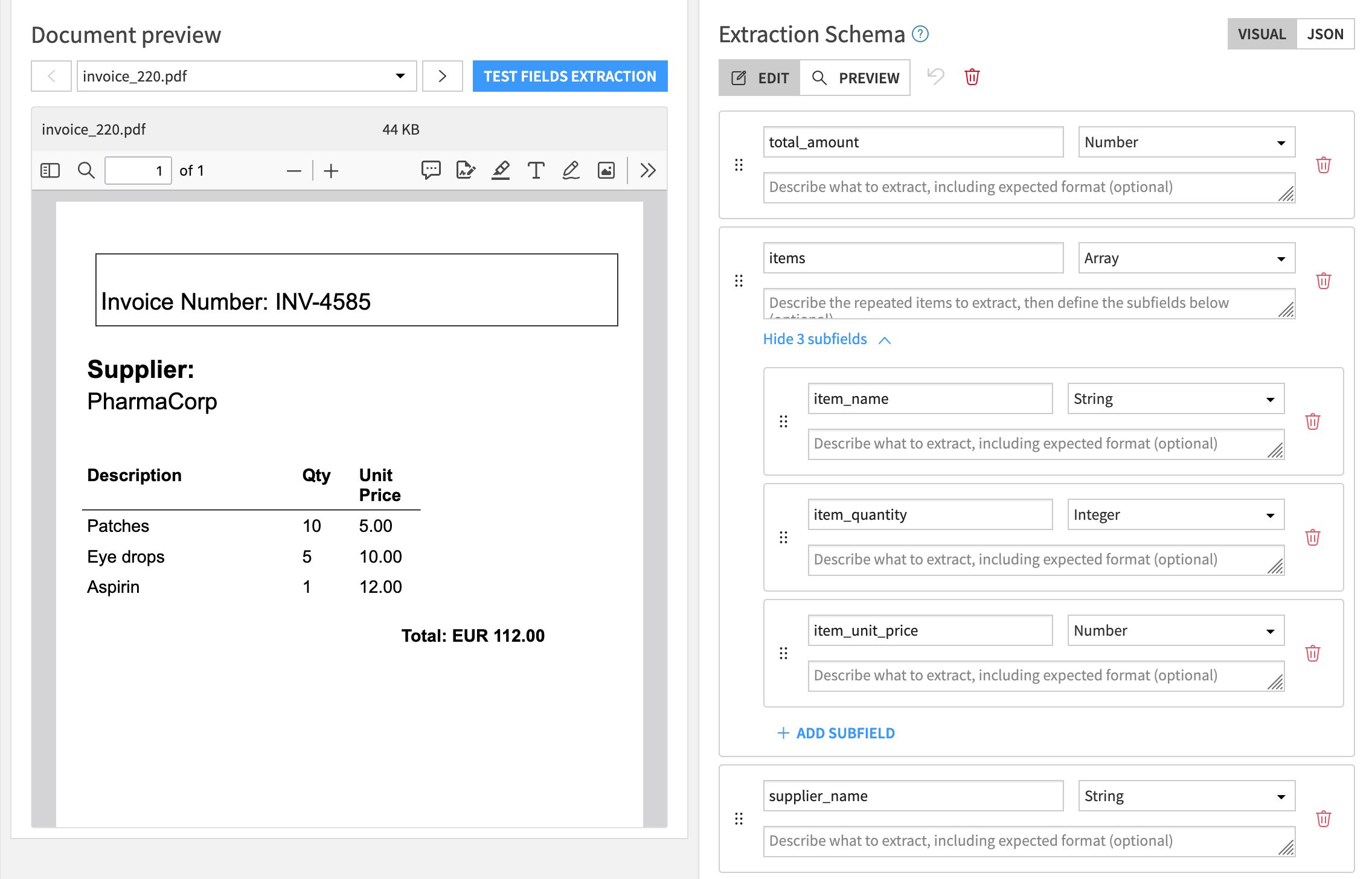
In this example:
total_amountis extracted as a single value.itemsis extracted as an array of items.
Warning
Changing the schema after the recipe has run invalidates the existing output dataset. Dataiku will warn you before you proceed, and you will need to run the recipe again to regenerate the output.
From schema to output: How arrays are handled#
When you define array fields with subfields in the extraction schema, Dataiku gives you two options for how they appear in the output dataset.
With array expansion disabled, each document occupies a single row, and the array field contains a nested object. This is useful when the output is consumed programmatically or stored as a nested object for later processing.

With array expansion enabled (default behavior), the output dataset contains one row per item, so several rows for the same document. This flat format is easier to filter, sort, and join with other datasets in the Flow.
Next steps#
For more details on how to use the Extract content recipe, see the following how-tos: