

Concept | Spark on Kubernetes#
Spark lets a single job spread its work across the whole cluster. A Spark configuration controls how that happens.
Spark configurations#
A Spark configuration, created under Administration > Settings > Spark, tells the cluster how to run a Spark application: its Spark properties (such as executor memory) and the parameters that connect Spark to Kubernetes. Dataiku runs standard, unmodified open-source Spark, so if you need to tune or debug a job, ordinary Spark documentation and troubleshooting apply.
An administrator sets a default Spark configuration for the instance. When a recipe runs on Spark, a user can select a different configuration for it, so a team can size a job without an administrator’s help.
Teams usually maintain a few sized configurations. The following example includes a standard configuration, a larger configuration for jobs that need more parallelism, and a high-memory configuration for jobs that need more memory.
Config key |
Standard |
Large |
High memory |
|---|---|---|---|
spark.executor.instances |
4 |
12 |
4 |
spark.executor.memory |
6g |
6g |
12g |
spark.executor.cores |
2 |
2 |
2 |
spark.kubernetes.memoryOverheadFactor |
0.4 |
0.4 |
0.6 |
spark.driver.memory |
1g |
1g |
3g |
spark.sql.shuffle.partitions |
40 |
80 |
80 |
spark.sql.broadcastTimeout |
3600 |
3600 |
3600 |
spark.port.maxRetries |
200 |
200 |
200 |
spark.driver.host |
the Dataiku host IP |
the Dataiku host IP |
the Dataiku host IP |
Note
Running Spark on a cluster relies on the same access as any other workload: a group needs Use rights on the cluster. See Concept | Cluster permissions.
Client mode and PySpark notebooks#
Spark runs in client mode: the driver, which coordinates the job, runs on the Design or Automation node, while the executors that do the work run in pods on the cluster.
This has a practical consequence for PySpark notebooks. Because the driver belongs on the node, you run a PySpark notebook locally. If you instead select a container configuration for the notebook and then start a Spark session, the notebook fails.
See also
See Tutorial | Configure Spark on Kubernetes to learn how to run a PySpark notebook correctly.
Fast path and slow path#
When a Spark job reads its data, it moves that data in one of two ways:
On the fast path, the cluster reads from the source directly and in parallel.
On the slow path, the data is funneled one stream at a time through the Dataiku node, which is much slower.
Important
The fast path has two requirements:
The data sits in storage that Spark can read natively, such as Amazon S3, Azure Blob Storage, Google Cloud Storage, or Snowflake.
The user running the job holds the Details readable by permission on that connection.
If either is missing, the job falls back to the slow path, and the interface warns you.
Spark pipelines and logging#
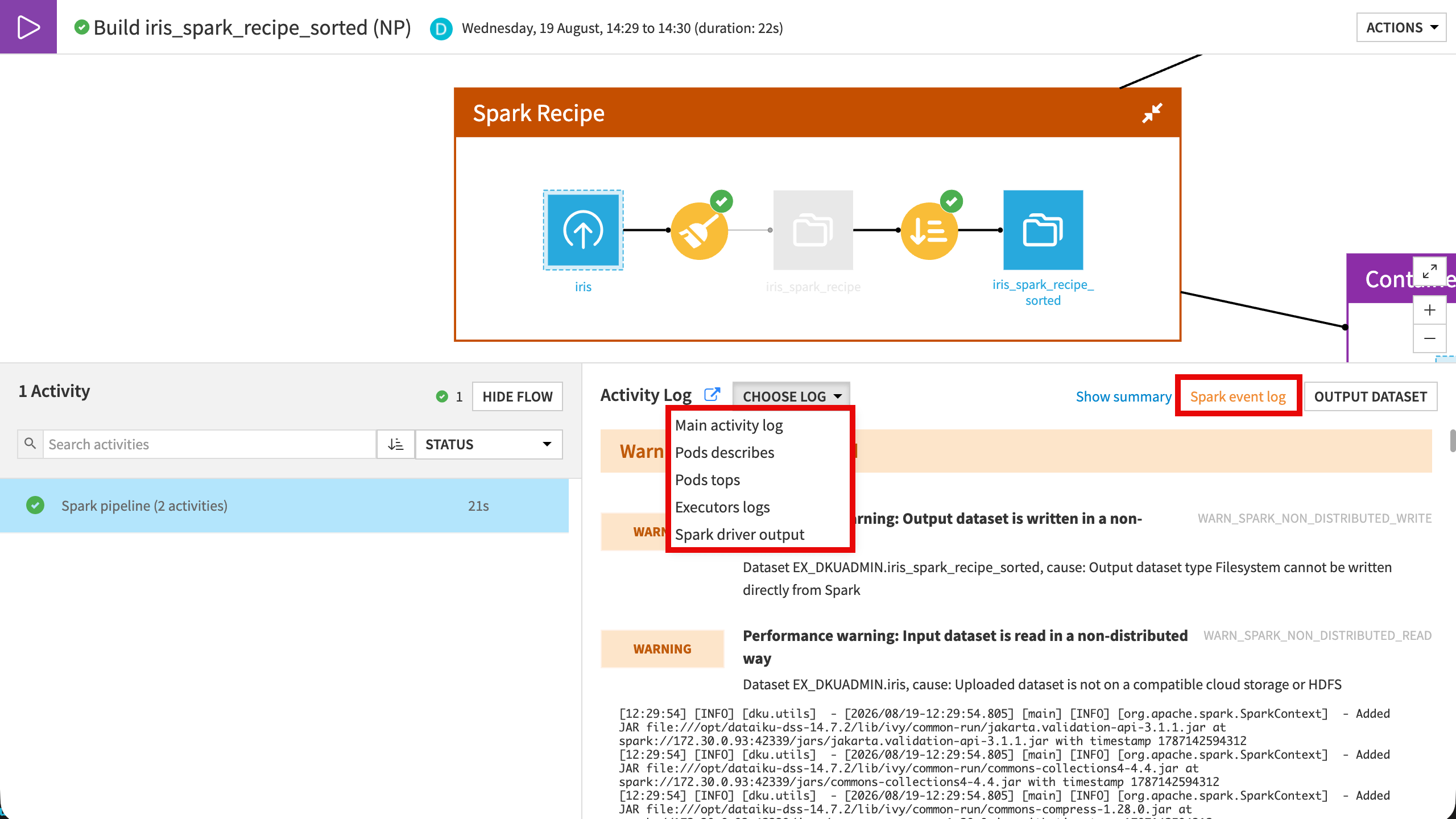
Consecutive Spark recipes can be merged into a single Spark pipeline (under Project Settings > Flow Build & Pipelines), so intermediate results stay in memory instead of being written to storage and read back. You can also mark an intermediate dataset as virtual to skip writing it entirely.
When you need to debug a job, open it from the Jobs page. Choose Log gives you the driver and executor logs, and the pod descriptions. Spark event log opens the Spark History Server for a per-stage view of the run.
Next steps#
To configure Spark on Kubernetes hands-on, see Tutorial | Configure Spark on Kubernetes.
See also
For more information, see the reference documentation on DSS and Spark.