

Concept | Scaling in Dataiku#
It’s important for administrators to understand where computation happens, so that they can build a flexible, stable platform that adapts to the varying workloads their users create.
The goal of scaling#
A Dataiku instance has finite CPU and memory, but the data it works with is often far larger than it can process on its own. Scaling is the practice of not doing the heavy lifting on the Dataiku node itself. Instead, Dataiku delegates the computation to a system built to handle it and brings back only the result.
Recipes, Notebooks, or model trainings can run in one of three places:
Locally, the default for lightweight work, limited by the node’s own CPU and memory.
Pushed down to a database, close to where the data already lives.
Pushed out to an Elastic AI cluster, spread across many machines.
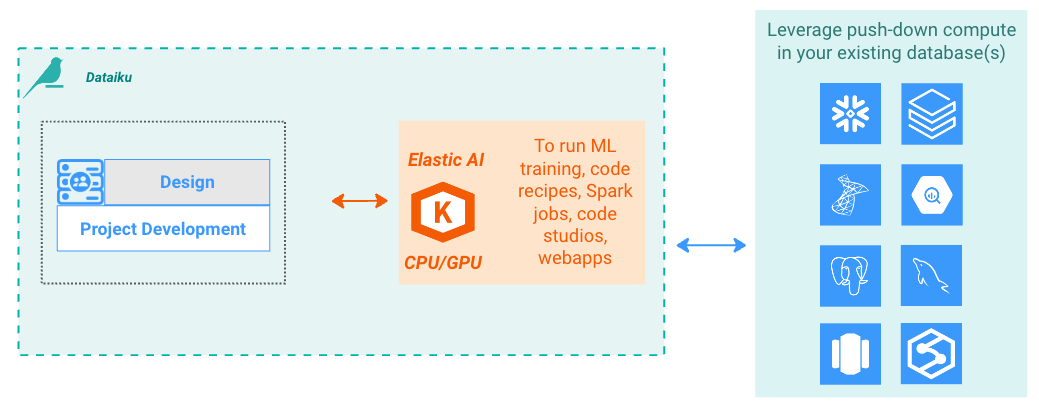
Local execution needs no setup. Push-down and Elastic AI, the focus of this concept, both require administrator configuration and good user practices to use effectively.
Push-down to a database#
Rather than pulling data into Dataiku to process it, Dataiku can push the computation down to where the data already sits. When a dataset is backed by an SQL connection, visual recipes are translated into SQL and run by the database engine. Therefore, no data has to move, and the work scales with the database.
Push-down suits the data preparation stage on data that already lives in an SQL database or warehouse. Because the database does the work, push-down needs no cluster and no extra infrastructure.
Elastic AI: Scaling out to Kubernetes#
With Elastic AI, Dataiku offloads work to a Kubernetes cluster to scale out. It builds container images for the work, submits them to the cluster, and the cluster schedules them across its nodes, adding capacity on demand when it’s set up to autoscale.
Two engines run this way:
Containerized execution runs Python and R code, visual recipes, notebooks, and webapps inside containers on the cluster.
Spark distributes data processing across the cluster for large-scale workloads.
Compared with local execution, an Elastic AI cluster gives you capacity beyond a single machine, access to specialized hardware such as GPUs, and the ability to cap the CPU and memory each process may consume.
See also
For more information, see the reference documentation on Elastic AI computation.
Choosing where work runs#
The right target depends on the data and the workload:
Local execution requires no external system. It’s the simplest option, but it can only scale vertically by increasing the resources of the Dataiku instance. This is slower, requires more administrative effort, and is generally less cost-effective than the alternatives.
Push-down keeps computation close to data that already lives in an SQL database or data warehouse. This improves efficiency by minimizing data movement and leveraging the scalable resources of these platforms.
Elastic AI scales workloads horizontally across a Kubernetes cluster. It can scale both compute-intensive workloads through containerized execution and data-intensive workloads through Spark. It’s the only option that can fully leverage GPU hardware.
Whichever way you scale, the effect is the same: the Dataiku node offloads the heavy work to more scalable sub-systems, freeing it to orchestrate rather than compute.
Important
What’s available out of the box depends on your type of installation.
On Dataiku Cloud, Elastic AI is built in, Spark works out of the box with cloud storage, and SQL push-down is available when the connected platform supports it.
On a self-hosted installation (Cloud Stacks or Custom), you configure Elastic AI yourself, with managed or unmanaged clusters depending on your setup.
Next steps#
To configure the Elastic AI side, see Concept | Elastic AI clusters.