

How-to | Use Flow zones#
As your pipeline grows, your Flow can become visually overwhelming. Dataiku offers several strategies to improve readability and navigability, such as using Flow zones.
Flow zones allow you to logically group related objects within your Flow, creating a hierarchical organization structure.
To add a Flow zone and group related objects within it:
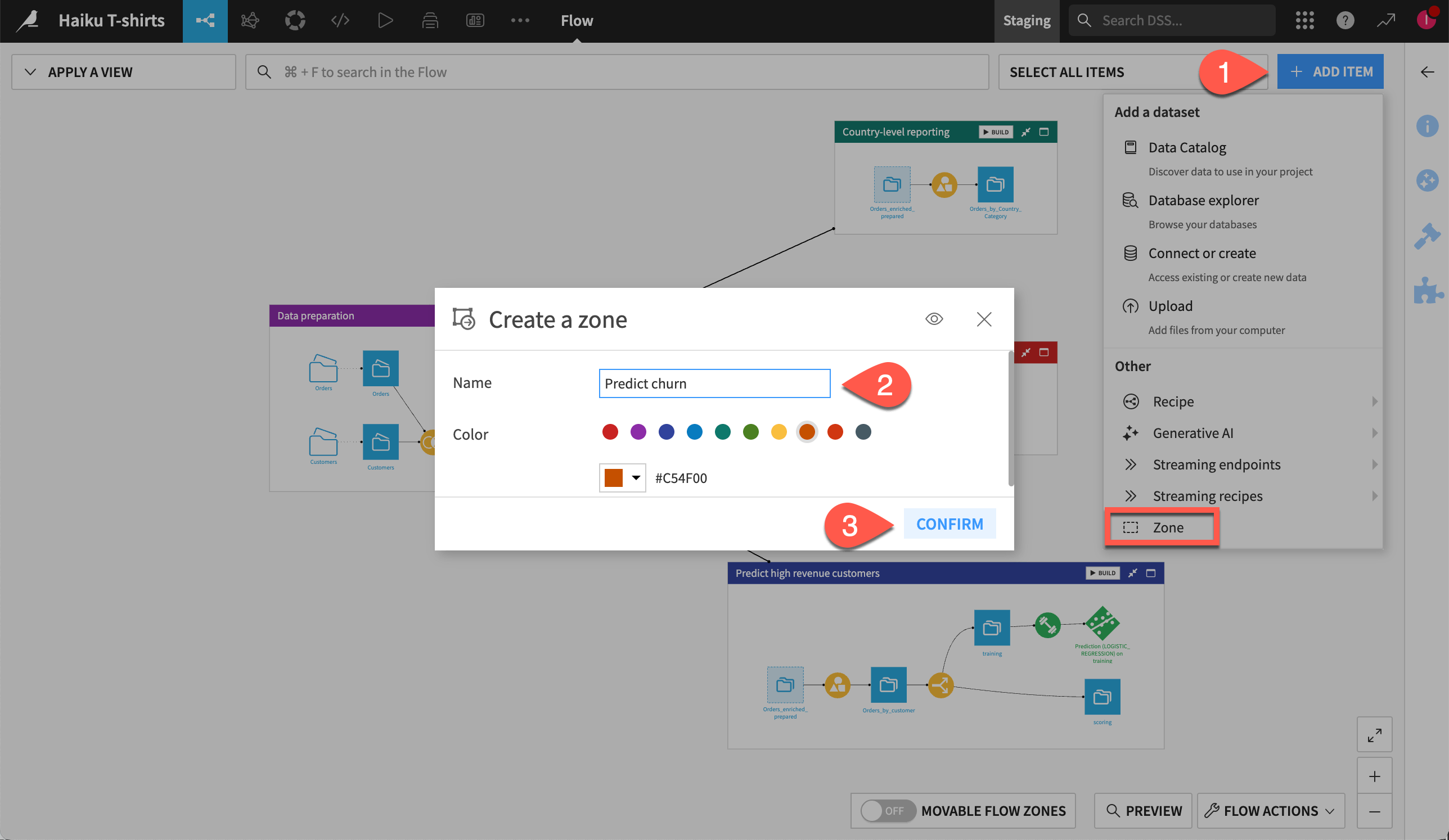
Click the + Add Item button at the top right of the Flow and select Zone.
In the dialog box:
Name the new zone.
Select a color to visually distinguish it from other zones.
Click Confirm to add the zone to your Flow.
To add objects to the zone:
Select the relevant objects in the Flow.
Right-click on them and choose Move to a Flow zone.
In the dialog box, select the relevant zone and click Move to confirm.
See also
How-to | Filter the Flow to create custom views of the Flow and only show relevant items on the screen.
How-to | Tag the Flow items to add tags to the different items of the Flow and use these tags to select which parts of the Flow to view.