

Tutorial | Agent skills#
Get started#
Agent skills let you include extensive, reusable instructions and resources for agents without incurring unnecessary token costs or confusing the agent with unnecessary context.
In this tutorial, you’ll put that into practice by building an agent that uses two agent skills with supporting resources. Then you’ll add the skills to a Simple Visual Agent that generates a weekly insights report from customer feedback data.
Objectives#
In this tutorial, you will:
Build agent skills with extensive instructions.
Add supporting resources for the agent to use in certain cases.
Attach the skills to an AI agent and test them.
Prerequisites#
To complete this tutorial, you will need:
Dataiku 15.0 or later.
Knowledge of AI agents in Dataiku, and ideally hands-on experience with Simple Visual Agents.
An Advanced Analytics Designer or Full Designer user profile.
A connection to at least one Generative AI model that supports tool calling. Your administrator must configure the connection(s) in the Administration panel > Connections > New connection > LLM Mesh.
An internal code environment for retrieval-augmented generation. Your administrator must set this up in the Administration panel > Code Envs > Internal envs setup > Retrieval augmented generation code environment.
Create the project#
If needed, from the Dataiku Design homepage, use the (
 ) icon to switch to the Designer view.
Click + New Project > Learning projects.
Search for and select Agent Skills.
If needed, change the folder into which the project will be installed, and click Create.
From the project homepage, click Go to Flow (or type
g+f).
Note
You can also download the starter project from this website and import it as a ZIP file.
Use case summary#
Your product team receives hundreds of customer reviews and support tickets every week for seven different products. Product managers on your team must comb through both datasets to glean information about their product.
The goal is to build a customer feedback analysis agent that product managers can access themselves and use to quickly summarize the latest feedback. The agent will:
Retrieve data from the customer_reviews and support_tickets datasets about the user’s specified product.
Classify sentiment and summarize the feedback from both data sources.
Compile the feedback into a structured report.
When creating this agent, you could write all of these directions into the instructions (system prompt).
However, instructions with this much detail would make the agent more costly to run and may hurt the response quality as LLMs often get confused when provided with irrelevant context. And the instructions could be useful to other teams in your company for summarizing multiple types of feedback.
So instead, you’ll create two agent skills that the agent will call only when needed and that can be reused across multiple agents and maintained in one place.
Create an agent#
Start by building a Simple Visual Agent that will coordinate the tasks of retrieving and summarizing the reviews.
The agent uses two agent tools that:
Lookup products from the customer_reviews dataset.
Lookup products from the support_tickets dataset.
The tools are already included in the tutorial project. Each one takes the product name as input from the user, looks up the product, and returns all information about it from the respective datasets.
Note
Each tool is set to return a maximum of five records to limit costs of completing this tutorial.
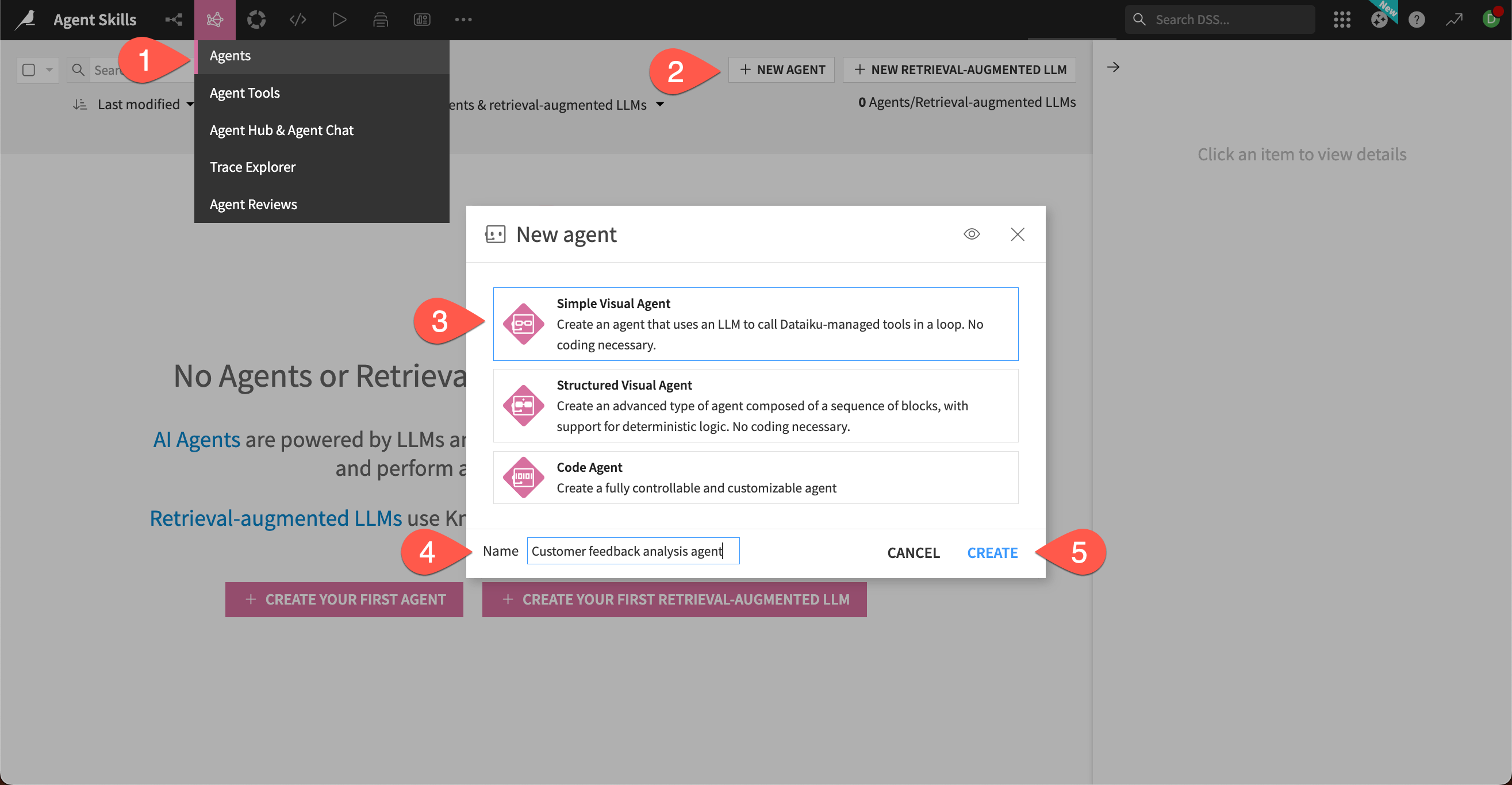
Go to the GenAI menu (
 ) > Agents.
Click + New Agent.
Choose Simple Visual Agent.
Give it the Name
Customer feedback analysis agent.Click Create.
Configure the agent#
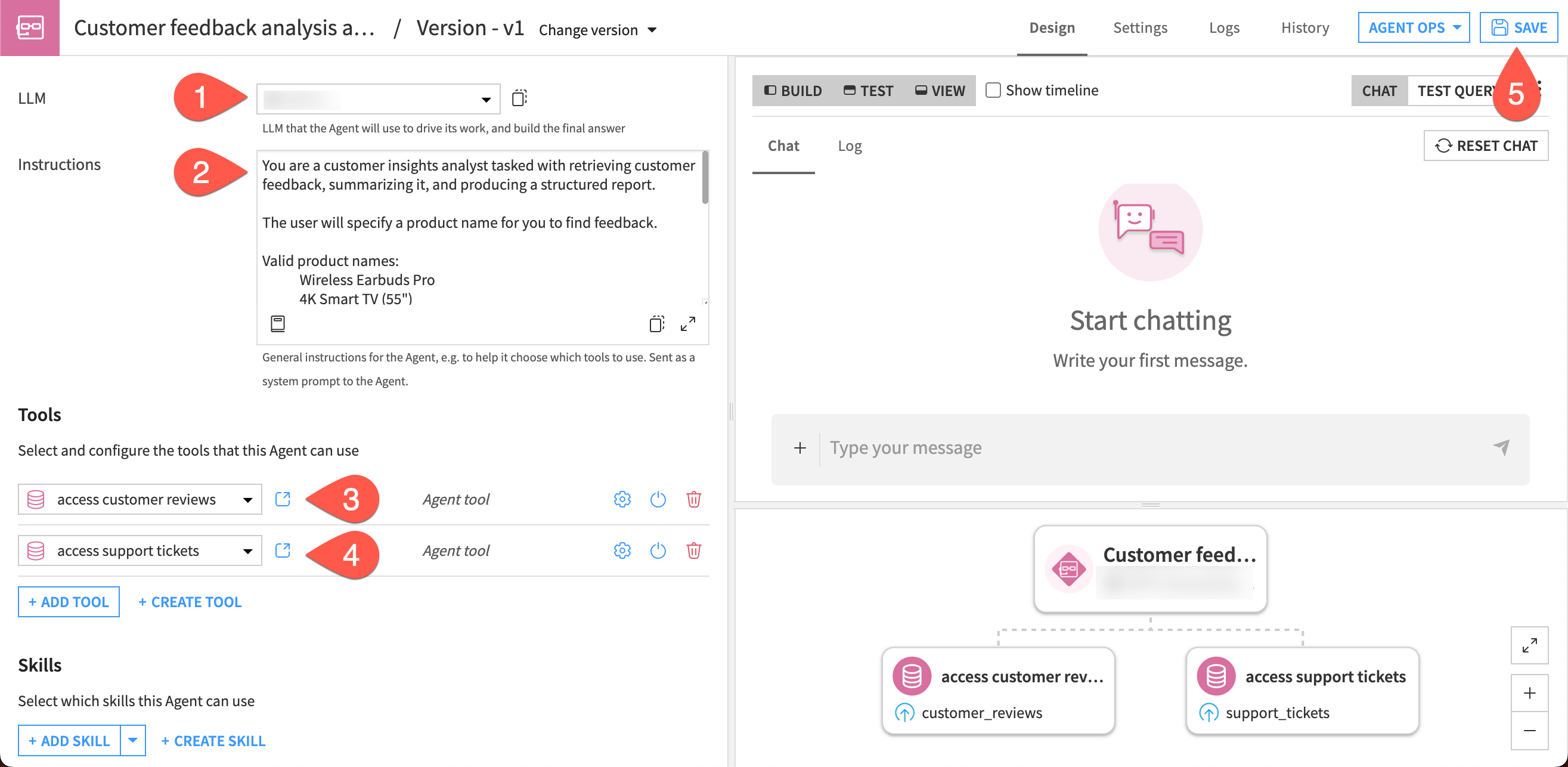
In the agent editor, set up the LLM and main instructions for the task. Because the agent skills will include more detailed directions, these will be short and tell the agent how to use the tools and skills.
In the LLM dropdown, choose from among your available models.
In the Instructions box, copy and paste this text:
You are a customer insights analyst tasked with retrieving customer feedback, summarizing it, and producing a structured report.

The user will specify a product name for you to find feedback.

Valid product names:
 Wireless Earbuds Pro
 4K Smart TV (55")
 Robot Vacuum X3
 Air Purifier Max
 Portable Blender
 Laptop Stand Deluxe
 Smart Home Hub

Use the tools `access customer reviews` and `access support tickets` to access the two datasets of customer feedback.

Use the skill `Customer feedback analysis` to classify and summarize customer feedback. Then use the skill `Report compilation` and the included template to produce a structured summary.
Under the Tools section, click + Add Tool and select the access customer reviews tool.
Do the same for the access support tickets tool.
Click Save in the top right.
Set up agent skills#
With the basic instructions set in the agent, create the skills it needs to complete specific tasks.
You’ll build two skills:
Customer feedback analysis: Instructions on how to analyze the feedback data.
Report compilation: Instructions on how to compile the final report.
Each skill will also include supporting resources.
Tip
This section contains some lengthy text instructions for you to copy into the skills. It is useful to read all the text blocks to understand what the skill does and how it is structured.
Build the Customer feedback analysis skill#
You can access the skill editor directly from the agent Design page.
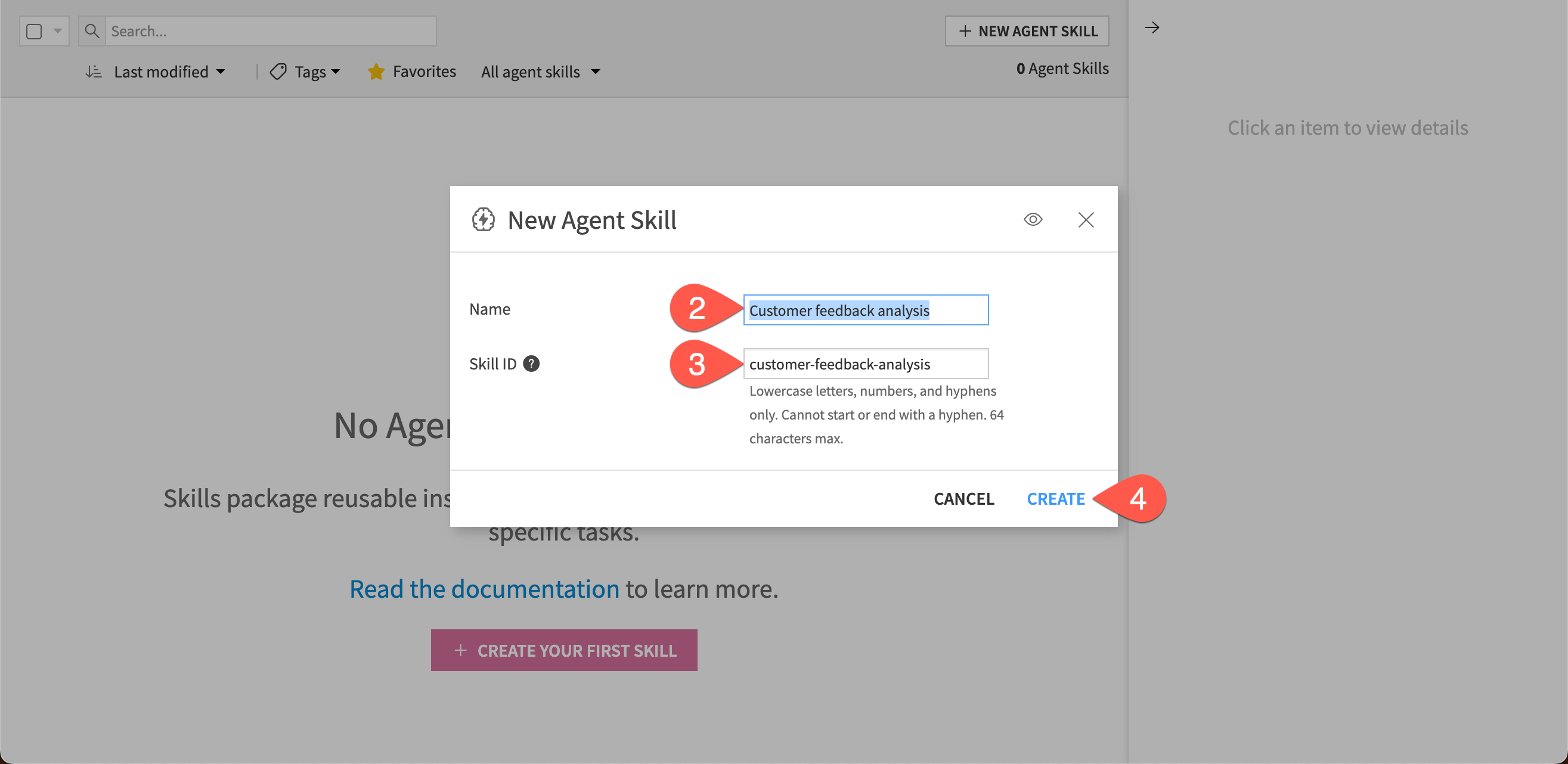
In the Skills section of the agent builder, click + Create Skill.
Give it the Name
Customer feedback analysis.Note the automatically created Skill ID, which the agent will use to identify the skill.
Click Create.
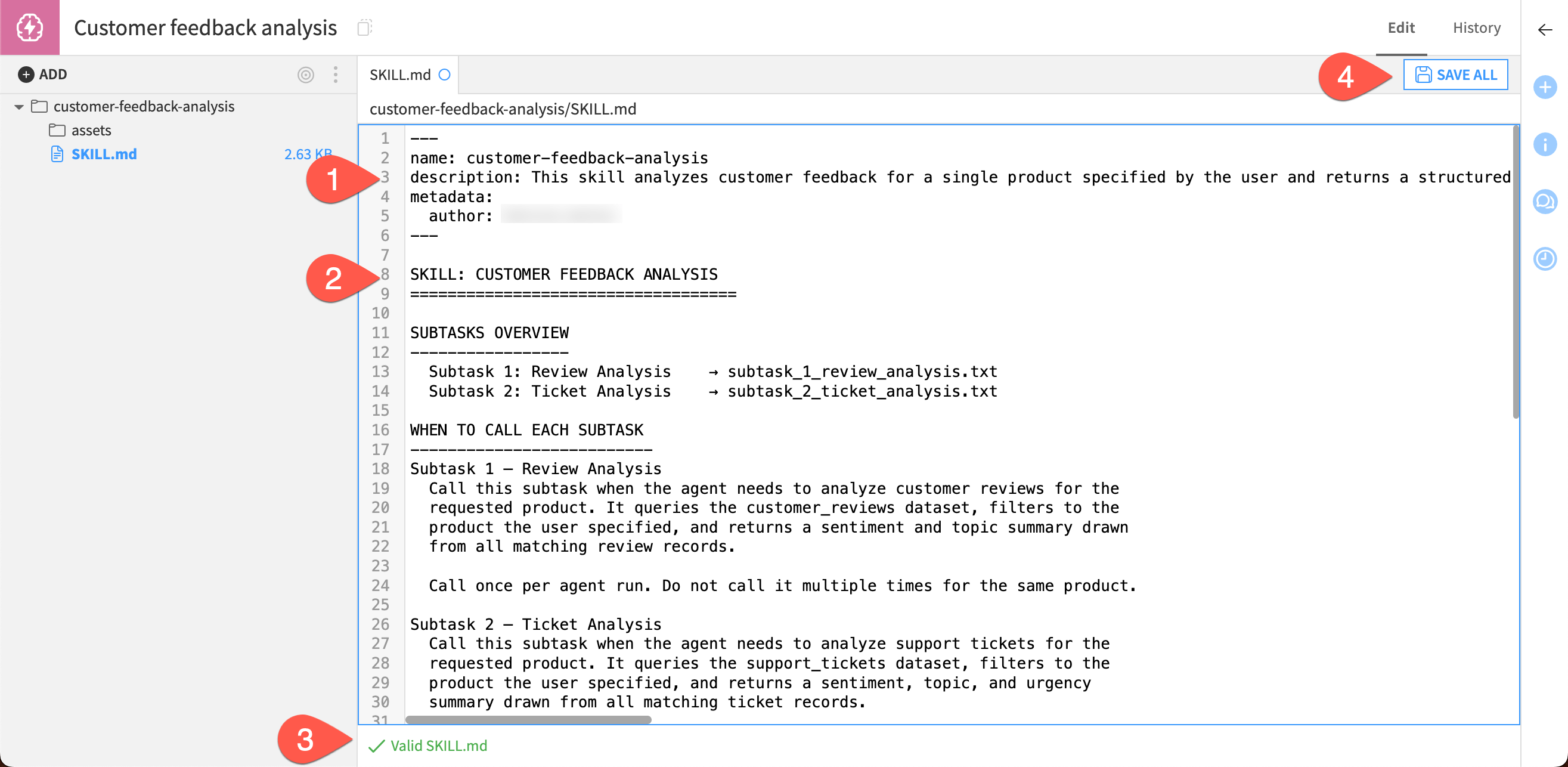
This creates a new SKILL.md file and opens an editor for the file. Here, you’ll add the description so the agent knows when to use the skill, and the instructions that provide in-depth guidance for the agent.
Next to description:, copy and paste this text:
This skill analyzes customer feedback for a single product specified by the user and returns a structured summary of findings. It contains two subtasks, one for customer reviews and another for support tickets. Each subtask takes output from the agent dataset lookup tools and produces a summary that the agent passes to the `Report compilation` skill. The agent calls whichever subtask is appropriate for the data it is working on. Each subtask processes all relevant records for the requested product in a single call.
In the main body of the file, replace the placeholder text with this:
SKILL: CUSTOMER FEEDBACK ANALYSIS
===================================

SUBTASKS OVERVIEW
-----------------
Subtask 1: Review Analysis → subtask_1_review_analysis.txt
Subtask 2: Ticket Analysis → subtask_2_ticket_analysis.txt

WHEN TO CALL EACH SUBTASK
--------------------------
Subtask 1: Review Analysis

Call this subtask when the agent needs to analyze customer reviews for the requested product. It queries the customer_reviews dataset, filters to the product the user specified, and returns a sentiment and topic summary drawn from all matching review records.

Call once per agent run. Do not call it multiple times for the same product.

Subtask 2: Ticket Analysis

Call this subtask when the agent needs to analyze support tickets for the requested product. It queries the support_tickets dataset, filters to the product the user specified, and returns a sentiment, topic, and urgency summary drawn from all matching ticket records.

Call once per agent run. Do not call it multiple times for the same product.

Both subtasks should be called in every standard agent run — Subtask 1 first, then Subtask 2. Their outputs are passed together to the Report Compilation Skill to generate the final report.

INPUTS
------
Both subtasks receive the same single input from the agent:

Field : product
Type  : string
Notes : The product name exactly as it appears in the dataset, taken from what the user specified. The agent should confirm the product name before calling either subtask — if the user's input is ambiguous, ask for clarification rather than guessing.

OUTPUTS
-------
Subtask 1 returns a review summary object. Subtask 2 returns a ticket summary object. Both are passed as inputs to the Report Compilation Skill.

See each subtask file for the full output schema.

EXECUTION ORDER
---------------
1. Receive product name from user.
2. Call Subtask 1 (Review Analysis) for that product.
3. Call Subtask 2 (Ticket Analysis) for that product.
4. Pass both outputs to the Report Compilation Skill.
Make sure the checker at the bottom reads Valid SKILL.md.
Click Save All.
Tip
If the checker says the skill is invalid, it will also point you to the problem to fix, such as a line break in the description.
With these instructions, the agent will only call subtasks that are relevant to the task.
For example, if the agent tools don’t retrieve any results from the support_tickets dataset, the agent will not use the Ticket Analysis subtask. This means the agent will use fewer tokens than if it had to read all the instructions for every run, reducing context bloat.
Add subtasks#
You’ll add the subtasks as text files in the assets folder of this skill. The first subtask provides instructions for analyzing customer reviews.
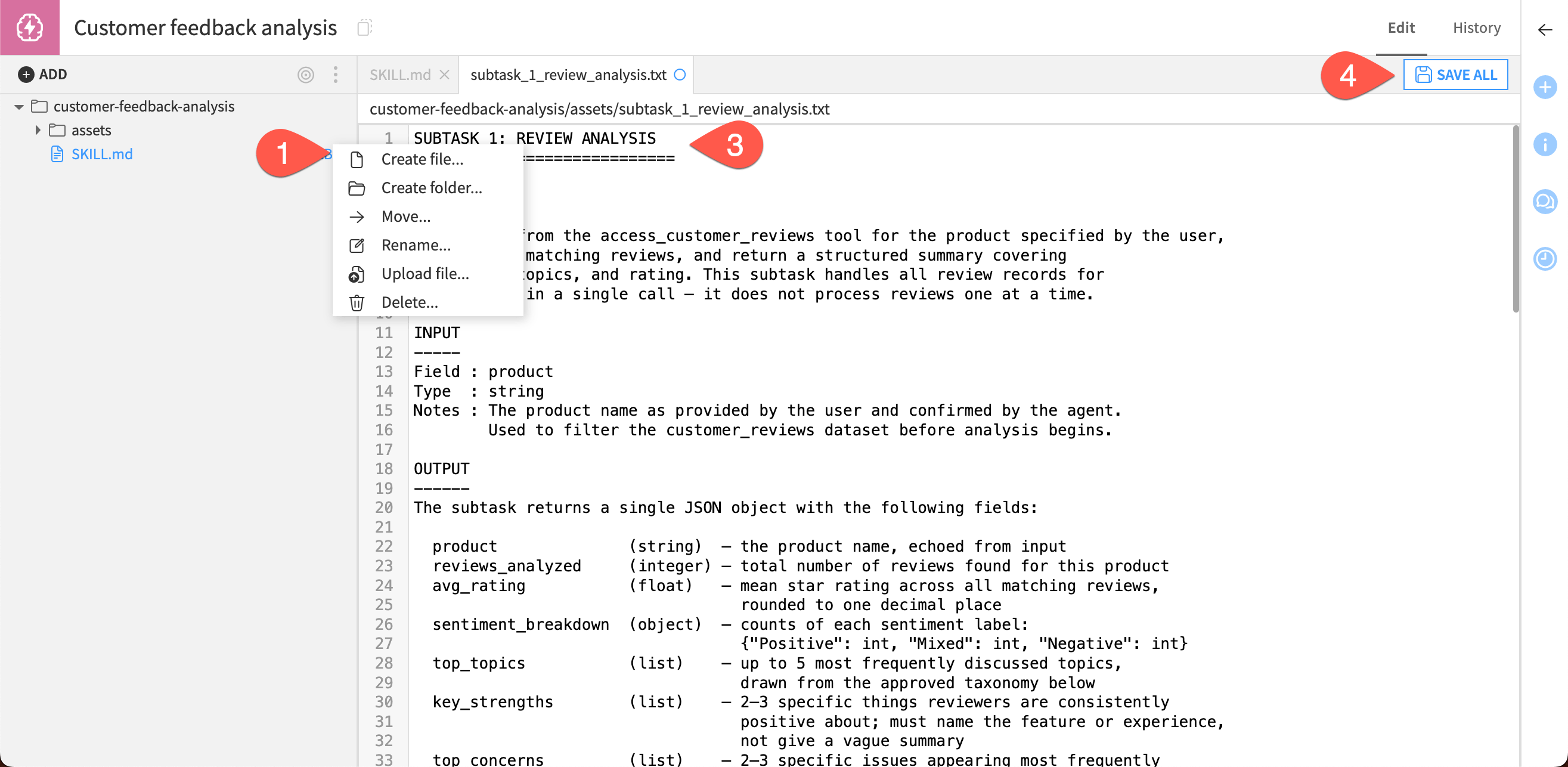
Click on the More options button (
 ) of the assets folder and choose Create file.
Give it the Name
subtask_1_review_analysis.txtand click Create.In the text editor, copy and paste the following text:
SUBTASK 1: REVIEW ANALYSIS
============================

PURPOSE
-------
Take input from the access_customer_reviews tool for the product specified by the user, analyze all matching reviews, and return a structured summary covering sentiment, topics, and rating. This subtask handles all review records for the product in a single call — it does not process reviews one at a time.

INPUT
-----
Field: product
Type: string
Notes: The product name as provided by the user and confirmed by the agent.
Used to filter the customer_reviews dataset before analysis begins.

OUTPUT
------
The subtask returns a single JSON object with the following fields:

product (string)  — the product name, echoed from input
reviews_analyzed (integer) — total number of reviews found for this product
avg_rating   (float)  — mean star rating across all matching reviews, rounded to one decimal place
sentiment_breakdown  (object)  — counts of each sentiment label: {"Positive": int, "Mixed": int, "Negative": int}
top_topics   (list) — up to 5 most frequently discussed topics, drawn from the approved taxonomy below
key_strengths (list) — 2–3 specific things reviewers are consistently positive about; must name the feature or experience, not give a vague summary
top_concerns (list) — 2–3 specific issues appearing most frequently in negative or mixed reviews
recommended_actions  (list) — 2–3 concrete actions for the product team, grounded in what the reviews actually say

APPROVED TOPIC TAXONOMY
------------------------
Use only labels from this list when populating top_topics. Do not create variations or synonyms.

sound_quality — Audio output quality (volume, clarity, bass, distortion)
battery_life — Battery duration, charging speed, or power-related issues
connectivity — Bluetooth, WiFi, pairing, or network connection issues
app_experience — Companion app usability, crashes, missing features, bugs
ease_of_use — Setup difficulty, intuitiveness, learning curve
build_quality — Physical construction, materials, durability, finish
design — Aesthetics, form factor, size, color, ergonomics
performance — Speed, accuracy, core function effectiveness
reliability — Consistency over time, unexpected failures, glitches
value_for_money — Price-to-quality ratio, whether cost feels justified
customer_service — Responsiveness, helpfulness, resolution quality of support
shipping — Delivery speed, packaging, arrival condition
documentation — Manual clarity, setup instructions, FAQs
other — Use only if no listed topic applies

SYSTEM PROMPT
------------------------
You are a customer insights analyst. The user has requested a feedback report for: {product}.

Analyze all matching reviews and return a structured summary. Follow these rules:

1. Count the total number of matching reviews for reviews_analyzed.
2. Calculate the mean star rating for avg_rating (round to one decimal place).
3. Classify each review's overall sentiment as Positive, Mixed, or Negative, then count each for sentiment_breakdown.
- Positive: customer is overall satisfied or enthusiastic
- Mixed: customer has both praise and criticism
- Negative: customer is overall dissatisfied or frustrated
4. Identify the top 5 most discussed topics using only the approved taxonomy
5. Identify 2-3 key strengths: specific, named features or experiences that reviewers praise consistently. Do not be vague.
6. Identify 2-3 top concerns: specific issues that appear most frequently in negative or mixed reviews.
7. Provide 2-3 recommended actions for the product team that are concrete and directly grounded in the review content.

Respond ONLY in valid JSON using this exact schema:
{
 "product": "string",
 "reviews_analyzed": int,
 "avg_rating": float,
 "sentiment_breakdown": {"Positive": int, "Mixed": int, "Negative": int},
 "top_topics": ["string"],
 "key_strengths": ["string"],
 "top_concerns": ["string"],
 "recommended_actions": ["string"]
}

EXAMPLE OUTPUT
--------------
{
 "product": "Wireless Earbuds Pro",
 "reviews_analyzed": 38,
 "avg_rating": 3.8,
 "sentiment_breakdown": {"Positive": 22, "Mixed": 9, "Negative": 7},
 "top_topics": ["sound_quality", "connectivity", "battery_life", "app_experience", "build_quality"],
 "key_strengths": [
 "Sound quality consistently praised — reviewers highlight strong bass and clarity",
    "Battery life meets or exceeds expectations for most users"
 ],
 "top_concerns": [
  "Bluetooth connectivity drops reported by multiple reviewers, particularly after the recent firmware update",
  "Left earbud volume imbalance mentioned in 4 separate reviews"
 ],
 "recommended_actions": [
  "Investigate firmware update released last month as a likely cause of connectivity drop reports",
  "Review QC process for left earbud volume calibration — recurring issue across multiple units"
 ]
}
Click Save All.
Next, add the subtask that contains instructions for analyzing the support tickets.
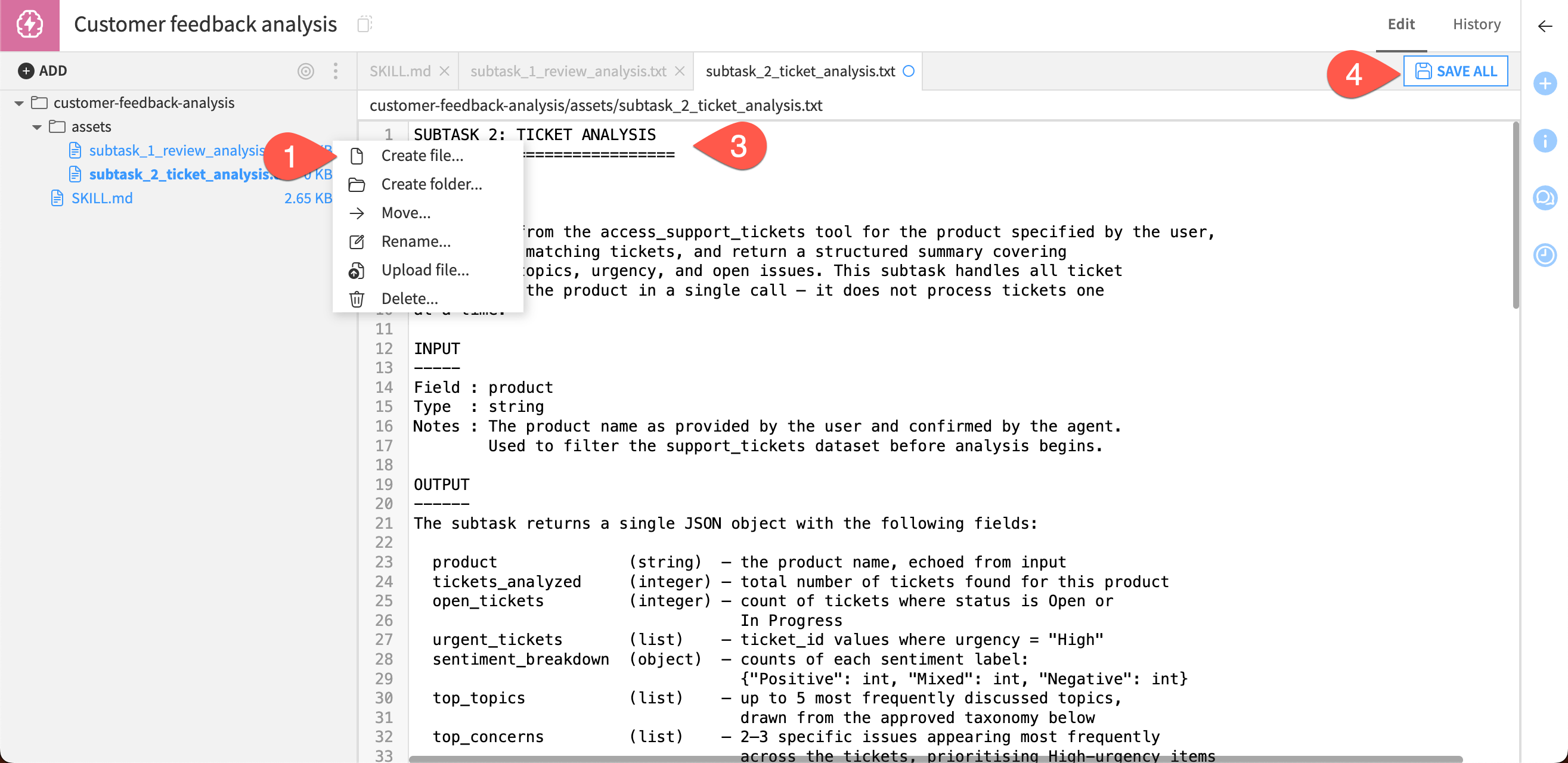
Go to the More options (
) button on the assets folder and choose Create file.Give it the Name
subtask_2_ticket_analysis.txtand click Create.In the text editor to the right, copy and paste the following text:
SUBTASK 2: TICKET ANALYSIS
============================

PURPOSE
-------
Take input from the access_support_tickets tool for the product specified by the user, analyze all matching tickets, and return a structured summary covering sentiment, topics, urgency, and open issues. This subtask handles all ticket records for the product in a single call — it does not process tickets one at a time.

INPUT
-----
Field : product
Type  : string
Notes : The product name as provided by the user and confirmed by the agent.
Used to filter the support_tickets dataset before analysis begins.

OUTPUT
------
The subtask returns a single JSON object with the following fields:

product (string) — the product name, echoed from input
tickets_analyzed (integer) — total number of tickets found for this product
open_tickets (integer) — count of tickets where status is Open or In Progress
urgent_tickets (list) — ticket_id values where urgency = "High"
sentiment_breakdown (object)  — counts of each sentiment label: {"Positive": int "Mixed": int, "Negative": int}
top_topics (list) — up to 5 most frequently discussed topics, drawn from the approved taxonomy below
top_concerns (list) — 2-3 specific issues appearing most frequently across the tickets, prioritizing High-urgency items
recommended_actions  (list) — 2-3 concrete actions for the support or product team, grounded in the ticket content

APPROVED TOPIC TAXONOMY
------------------------
Use only labels from this list when populating top_topics. Do not create variations or synonyms.

sound_quality — Audio output quality (volume, clarity, bass, distortion)
battery_life — Battery duration, charging speed, or power-related issues
connectivity — Bluetooth, WiFi, pairing, or network connection issues
app_experience — Companion app usability, crashes, missing features, bugs
ease_of_use — Setup difficulty, intuitiveness, learning curve
build_quality — Physical construction, materials, durability, finish
design — Aesthetics, form factor, size, color, ergonomics
performance — Speed, accuracy, core function effectiveness
reliability — Consistency over time, unexpected failures, glitches
value_for_money — Price-to-quality ratio, whether cost feels justified
customer_service — Responsiveness, helpfulness, resolution quality of support
shipping — Delivery speed, packaging, arrival condition
documentation — Manual clarity, setup instructions, FAQs
other — Use only if no listed topic applies

SYSTEM PROMPT
------------------------
You are a customer support analyst. The user has requested a feedback report for: {product}.

Analyze all matching tickets and return a structured summary. Follow these rules:

1. Count the total number of matching tickets for tickets_analyzed.
2. Count tickets where status is "Open" or "In Progress" for open_tickets.
3. List all ticket_id values where urgency = "High" in urgent_tickets. If none exist, return an empty list.
4. Classify each ticket's overall sentiment as Positive, Mixed, or Negative, then count each for sentiment_breakdown.
- Positive: customer is satisfied or reporting a resolved issue positively
- Mixed: ticket contains both frustration and constructive tone
- Negative: customer is frustrated, critical, or reporting an unresolved problem
5. Identify the top 5 most discussed topics using only the approved taxonomy
6. Identify 2-3 top concerns: the issues that appear most frequently or are linked to High-urgency tickets. Be specific — name what is failing.
7. Provide 2-3 recommended actions for the support or product team that are concrete and directly grounded in the ticket content. Prioritize actions that address High-urgency items.

Respond ONLY in valid JSON using this exact schema:
{
 "product": "string",
 "tickets_analyzed": int,
 "open_tickets": int,
 "urgent_tickets": ["string"],
 "sentiment_breakdown": {"Positive": int, "Mixed": int, "Negative": int},
 "top_topics": ["string"],
 "top_concerns": ["string"],
 "recommended_actions": ["string"]
}

EXAMPLE OUTPUT
--------------
{
 "product": "Smart Home Hub",
 "tickets_analyzed": 14,
 "open_tickets": 9,
 "urgent_tickets": ["SUP-2043", "SUP-2071", "SUP-2088"],
 "sentiment_breakdown": {"Positive": 2, "Mixed": 1, "Negative": 11},
 "top_topics": ["connectivity", "app_experience", "reliability", "performance", "ease_of_use"],
 "top_concerns": [
  "Firmware update caused loss of connection to all paired devices — reported in 5 tickets, 3 of which are High urgency",
  "Automation routines resetting unexpectedly — 3 independent reports, all currently open"
 ],
 "recommended_actions": [
  "Escalate firmware connectivity issue to engineering immediately — multiple High-urgency tickets open",
  "Investigate automation routine persistence bug; identify whether it is linked to the same firmware update",
  "Proactively contact customers with open High-urgency tickets to provide a status update"
 ]
}
Click Save All.
Build the report compilation skill#
The second skill will instruct the agent regarding how to build a structured report from the analysis completed in the first skill.
You created the Customer feedback analysis skill from the agent configuration.
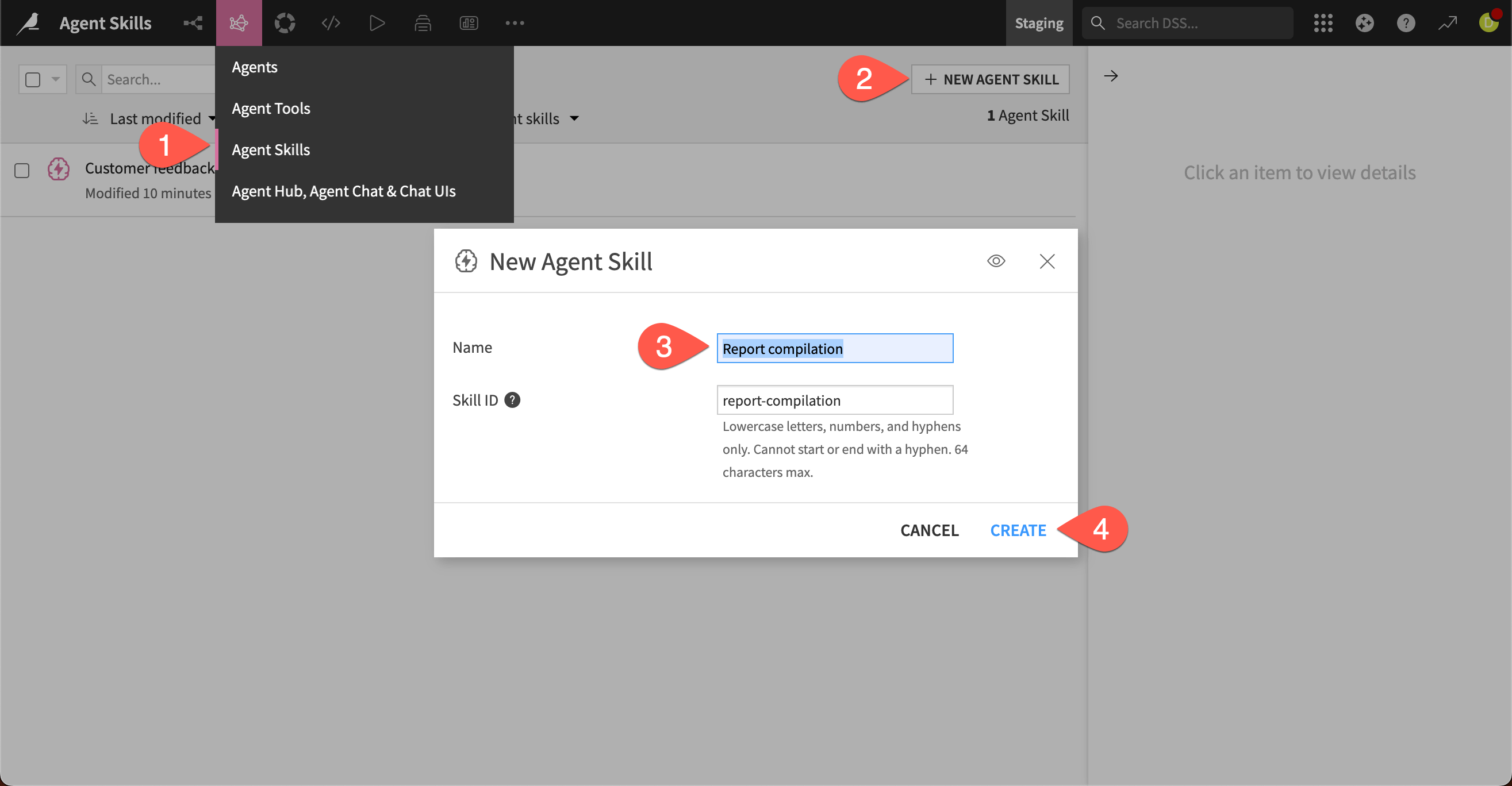
For this one, you’ll start in a different place: the Agent Skills page. Because skills are independent objects that can be used in multiple agents, you can create, edit, and share them from this page.
Go to the GenAI menu (
) > Agent Skills. Note the Customer feedback analysis skill is listed here.Click + New Agent Skill.
Give it the Name
Report compilation.Click Create.
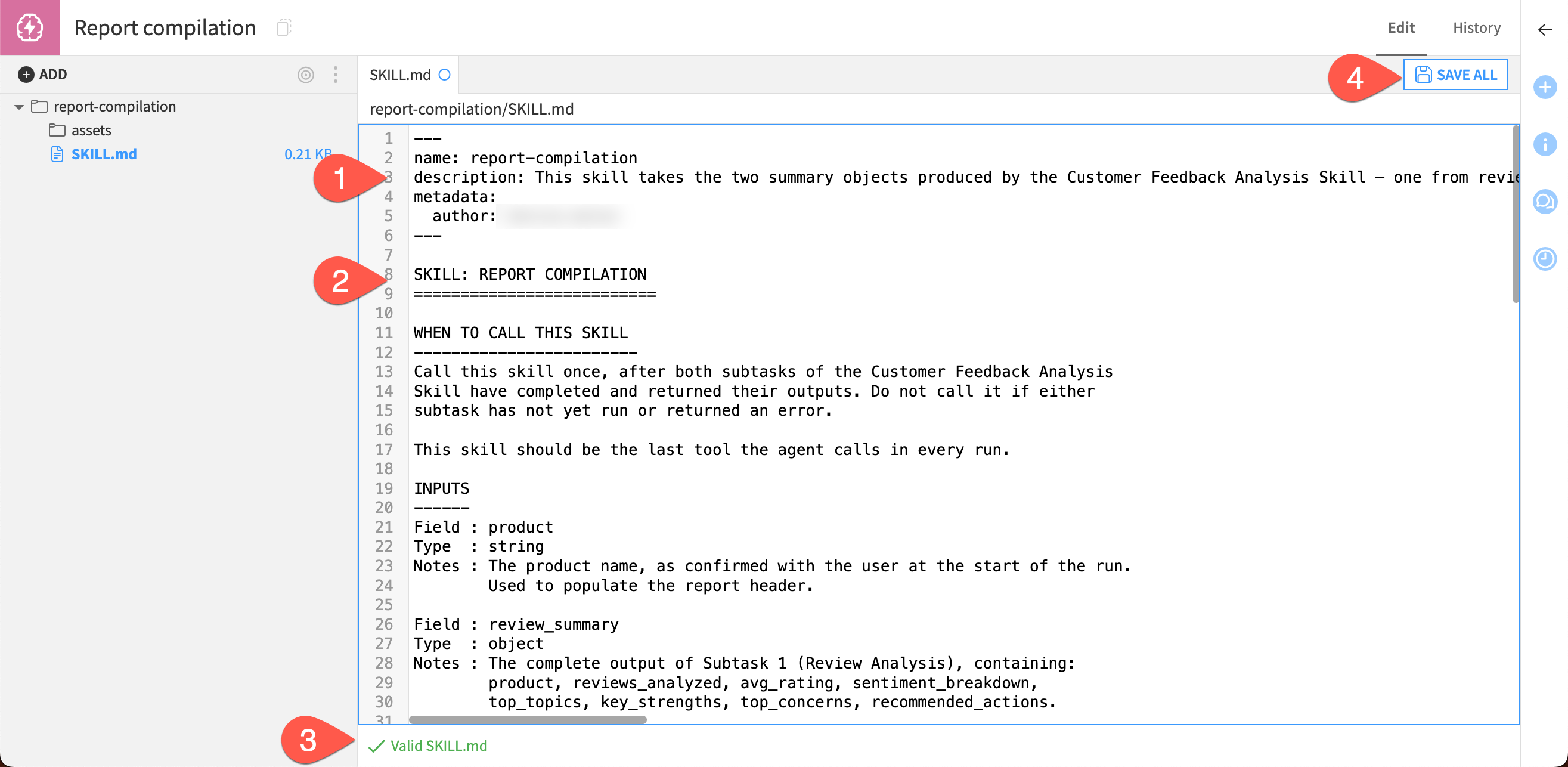
Now add the description and instructions.
In the SKILL.md file editor, copy and paste this next to the description:
This skill takes the two summary objects produced by the Customer Feedback Analysis Skill — one from reviews, one from support tickets — and compiles them into a single, readable product feedback report. It is the last step in the agent's workflow and runs once per agent run. This skill does not re-analyze raw feedback. All analysis has already been done by the time it is called. Its job is to combine both summaries, resolve any cross-source patterns, and write the output into the report template provided in `report_template.md`.
In the main body of the file, replace the placeholder text with this:
 SKILL: REPORT COMPILATION
 ==========================

 WHEN TO CALL THIS SKILL
 ------------------------
 Call this skill once, after both subtasks of the Customer Feedback Analysis Skill have completed and returned their outputs. Do not call it if either subtask has not yet run or returned an error.

 This skill should be the last tool the agent calls in every run.

 INPUTS
 ------
 Field : product
 Type  : string
 Notes : The product name, as confirmed with the user at the start of the run.
 Used to populate the report header.

 Field: review_summary
 Type: object
 Notes: The complete output of Subtask 1 (Review Analysis), containing:
 product, reviews_analyzed, avg_rating, sentiment_breakdown,
 top_topics, key_strengths, top_concerns, recommended_actions.

 Field: ticket_summary
 Type: object
 Notes: The complete output of Subtask 2 (Ticket Analysis), containing:
 product, tickets_analyzed, open_tickets, urgent_tickets,
 sentiment_breakdown, top_topics, top_concerns, recommended_actions.

 OUTPUT
 ------
 A completed markdown report, populated from the template in `report_template.md`. All placeholders must be replaced. If a field is genuinely empty — for example, no High-urgency tickets exist for this product — write "None." rather than leaving the placeholder in place.

 HOW TO FILL THE TEMPLATE
 -------------------------
 The template contains placeholders in the format [PLACEHOLDER]. Replace each one using the inputs described below.

 REPORT HEADER
 [PRODUCT_NAME]  → product input field

 AT A GLANCE
 [REVIEWS_analyzeD] → review_summary.reviews_analyzed
 [TICKETS_analyzeD] → ticket_summary.tickets_analyzed
 [OPEN_TICKETS] → ticket_summary.open_tickets
 [AVG_RATING] → review_summary.avg_rating (display as X.X / 5)

 SENTIMENT SNAPSHOT
 For the Reviews row:
 [REV_POSITIVE]  → review_summary.sentiment_breakdown.Positive
 [REV_MIXED] → review_summary.sentiment_breakdown.Mixed
 [REV_NEGATIVE]  → review_summary.sentiment_breakdown.Negative

 For the Tickets row:
 [TKT_POSITIVE]  → ticket_summary.sentiment_breakdown.Positive
 [TKT_MIXED] → ticket_summary.sentiment_breakdown.Mixed
 [TKT_NEGATIVE] → ticket_summary.sentiment_breakdown.Negative

 TOP TOPICS
 [TOP_TOPICS_REVIEWS] → review_summary.top_topics, as a comma-separated list
 [TOP_TOPICS_TICKETS] → ticket_summary.top_topics, as a comma-separated list

 URGENT TICKETS
 [URGENT_TICKETS] → ticket_summary.urgent_tickets, one ticket ID per line;
     if the list is empty, write "None."

 KEY STRENGTHS
 [KEY_STRENGTHS] → review_summary.key_strengths, as a bulleted list

 TOP CONCERNS
 [TOP_CONCERNS_REVIEWS] → review_summary.top_concerns, as a bulleted list
 [TOP_CONCERNS_TICKETS] → ticket_summary.top_concerns, as a bulleted list

 RECOMMENDED ACTIONS
 [RECOMMENDED_ACTIONS]   → combine review_summary.recommended_actions and        ticket_summary.recommended_actions into a single numbered list; where both sources recommend the same action, merge them into one item rather than duplicating; prioritize actions linked to High-urgency tickets or concerns appearing in both reviews and tickets

 WRITING GUIDELINES
 ------------------
- Write in plain, professional language suitable for a product or support team.
- Do not introduce conclusions that cannot be traced to the two summary inputs.
- When combining recommended actions from both sources, lead with the most urgent items — those linked to High-urgency tickets or appearing in both reviews and tickets.
- All placeholders must be replaced before the report is considered complete.
Verify the checker at the bottom says Valid SKILL.md.
Click Save All.
Add template#
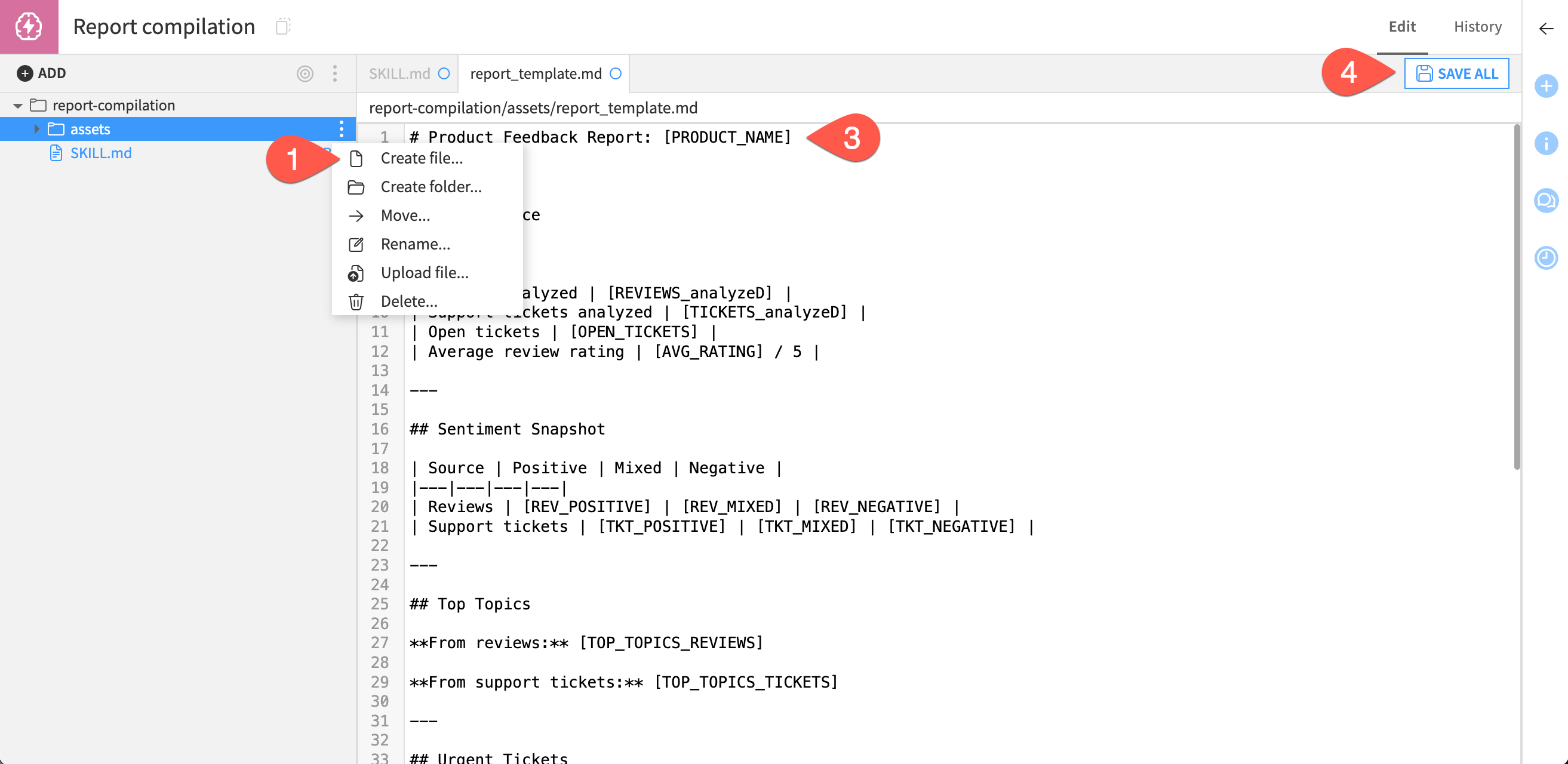
This skill will also include an additional resource: a Markdown template for the agent to fill out.
Create a new file from the More options (
) menu on the assets folder.Give it the name
report_template.md.In the text editor, copy and paste this text:
# Product Feedback Report: [PRODUCT_NAME]

---

## At a Glance

| | |
|---|---|
| Reviews analyzed | [REVIEWS_analyzeD] |
| Support tickets analyzed | [TICKETS_analyzeD] |
| Open tickets | [OPEN_TICKETS] |
| Average review rating | [AVG_RATING] / 5 |

---

## Sentiment Snapshot

| Source | Positive | Mixed | Negative |
|---|---|---|---|
| Reviews | [REV_POSITIVE] | [REV_MIXED] | [REV_NEGATIVE] |
| Support tickets | [TKT_POSITIVE] | [TKT_MIXED] | [TKT_NEGATIVE] |

---

## Top Topics

**From reviews:** [TOP_TOPICS_REVIEWS]

**From support tickets:** [TOP_TOPICS_TICKETS]

---

## Urgent Tickets

[URGENT_TICKETS]

---

## Key Strengths

[KEY_STRENGTHS]

---

## Top Concerns

**From reviews**
[TOP_CONCERNS_REVIEWS]

**From support tickets**
[TOP_CONCERNS_TICKETS]

---

## Recommended Actions

[RECOMMENDED_ACTIONS]

---

*Generated by the Customer Feedback Analysis Agent.*
Click Save All.
Use skills in the agent#
With both skills ready to go, you can add them to the agent and test them!
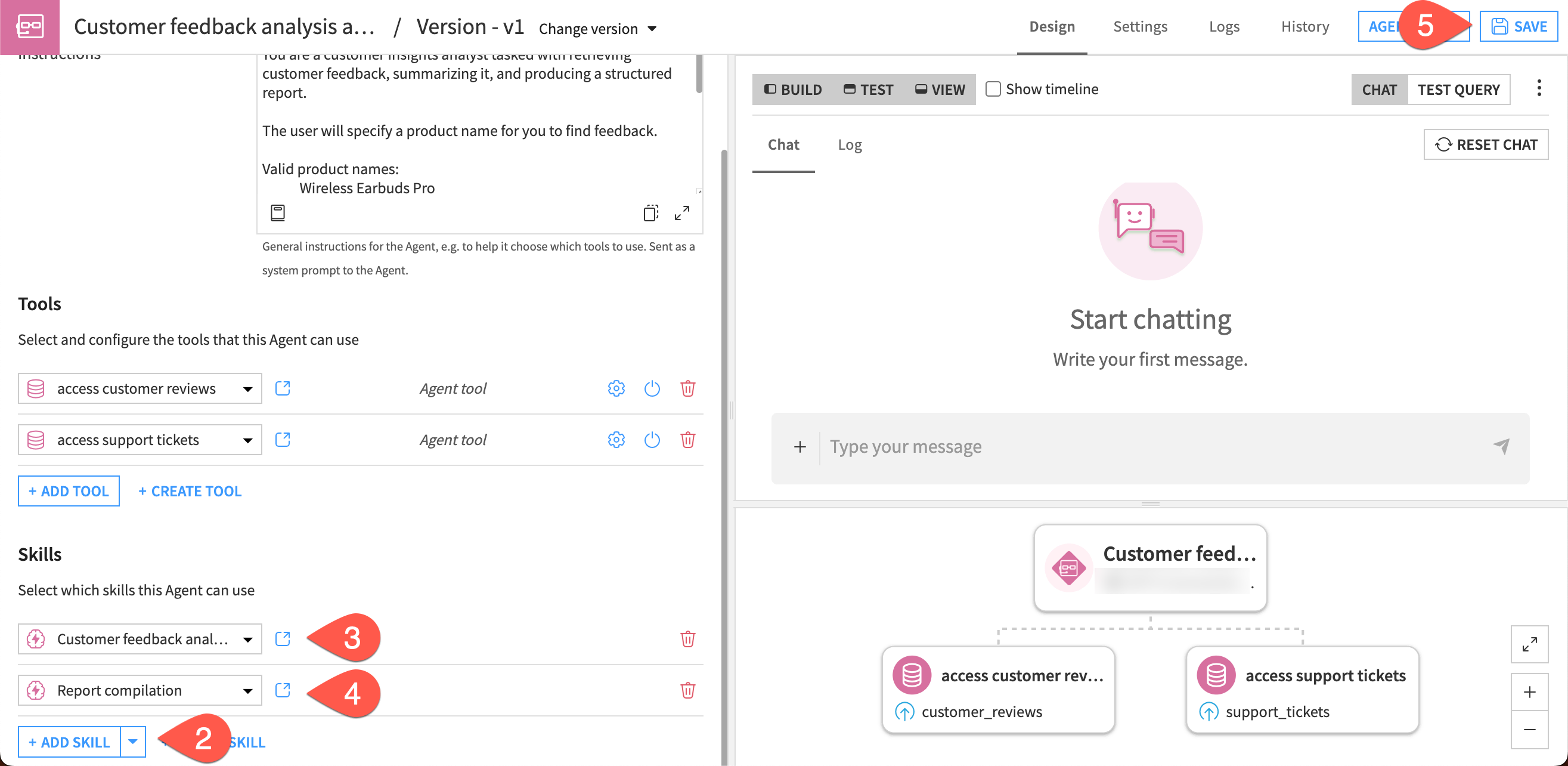
Return to the Customer feedback analysis agent via the GenAI (
) > Agents menu.In the Skills section, click + Add Skill.
Select the Customer feedback analysis skill.
Repeat for the Report compilation skill.
Click Save.
Test the agent and skills#
Test the agent and skills by running some simple prompts in the chat interface in the agent builder.
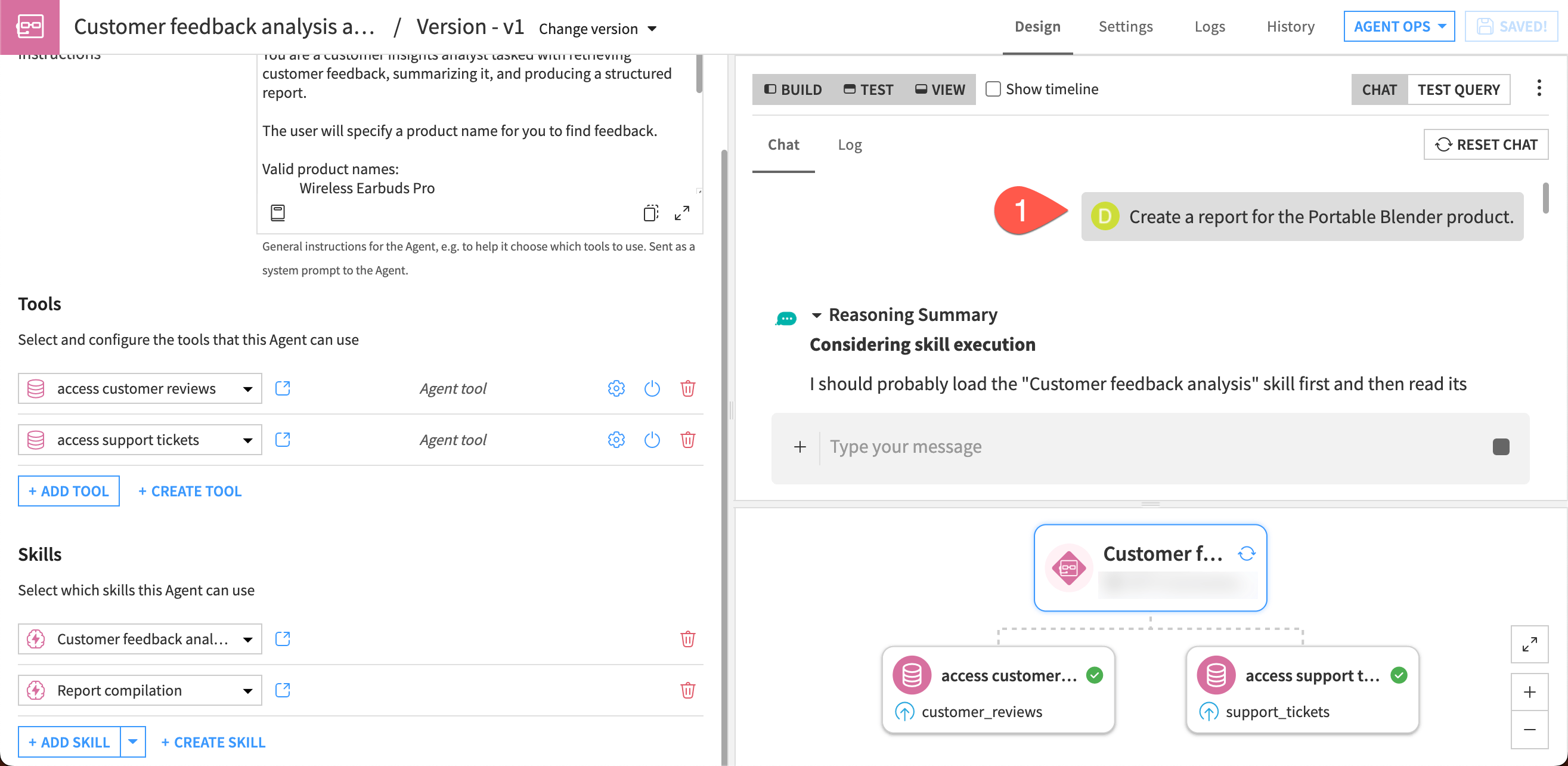
In the Chat window, copy and paste this inquiry:
Create a report for the Portable Blender product.
Send the message.
The agent should return the template, filled out with results of its analysis, in Markdown format.
If you’d like to continue testing, try a few other products in the data, such as Air Purifier Max, Laptop Stand Deluxe, or Smart Home Hub.
Important
Your results will vary depending on the model you’re using and can also differ from run to run. Also remember that the tools were set to return only five records from each dataset, so the summaries are based on small samples.
The skills you created for this agent could be reused in other agents. You can also edit skills if needed for reuse and share them to other Dataiku projects.