

Concept | Cluster permissions#
An Elastic AI cluster is a shared resource, so who can run work on it, and who can operate it, is controlled by permissions.
A cluster is a permissioned resource#
The permission model has three tiers: Global, Project, and Resource. Global permissions apply across the instance, project permissions control access to a single project, and resource permissions govern individual resources such as connections, code environments, and clusters.
An Elastic AI cluster sits at the Resource tier, so granting access to one works the same way as granting access to any other resource.
For the full model, see Concept | The Dataiku permissions model.
Cluster access levels#
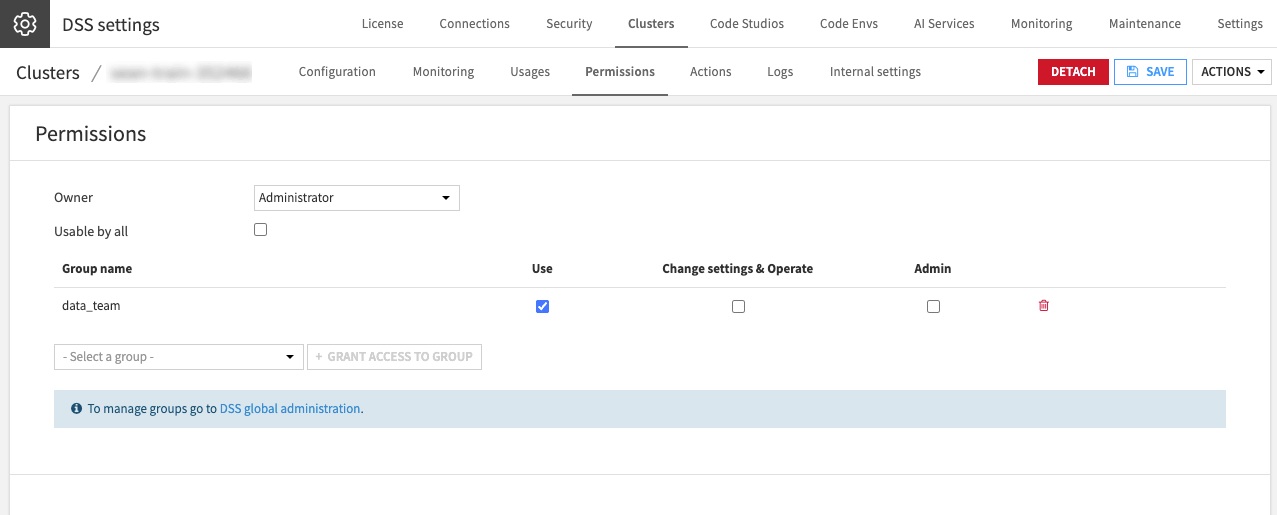
You configure these on the cluster’s Permissions tab. You grant a group one of three levels of access:
Level |
What it allows |
|---|---|
Use |
Send work to the cluster. |
Change settings & Operate |
Update the cluster’s settings and operate it. |
Admin |
Full control, including managing who else has access. |
Tip
Most data teams need only Use. Reserve Change Settings & Operate and Admin for the administrators who maintain the cluster.
See also
For details on each level, see Kubernetes clusters permissions in the reference documentation.
Identity on the cluster#
Granting access decides who may send work to the cluster. A separate question is what identity that work runs under once it reaches Kubernetes.
On Kubernetes, workloads run under a single service account that Dataiku uses, not under a separate account per user. Dataiku still tags each workload with the user who submitted it, so you can attribute activity on the cluster to a user, even though it doesn’t run under that user’s own identity. To learn how Dataiku isolates users more broadly, see Concept | Identity and access management in Dataiku.
Next steps#
To define the container configurations that run on a cluster, see Concept | Containerized execution.