

Concept | Containerized execution#
Once a cluster is available, a container configuration describes how work actually runs on it: which image to use, how large it can be, and where on the cluster it lands.
The execution triad#
Running a process in a container takes three pieces working together:
Piece |
What it provides |
Where it’s set |
|---|---|---|
Cluster |
Where the work runs |
An instance or project default |
Container configuration |
How the work runs |
Instance, project, or process level |
Code environment |
Which packages the work uses |
Its own definition |
The three are independent, but they must line up for a job to reach the cluster. The cluster is chosen as an instance-wide or per-project default. The container configuration is chosen the same way, and can additionally be overridden for a single process, on a recipe’s advanced settings or a notebook’s kernel. The code environment is selected on the recipe or notebook itself.
A job runs in a container only when both a cluster and a container configuration apply. With a cluster but no configuration, the work runs locally. With a configuration but no cluster, it fails. The rest of this article looks at what the container configuration in the middle actually defines.
What a container configuration defines#
A container configuration has two parts that decide which image runs, and where:
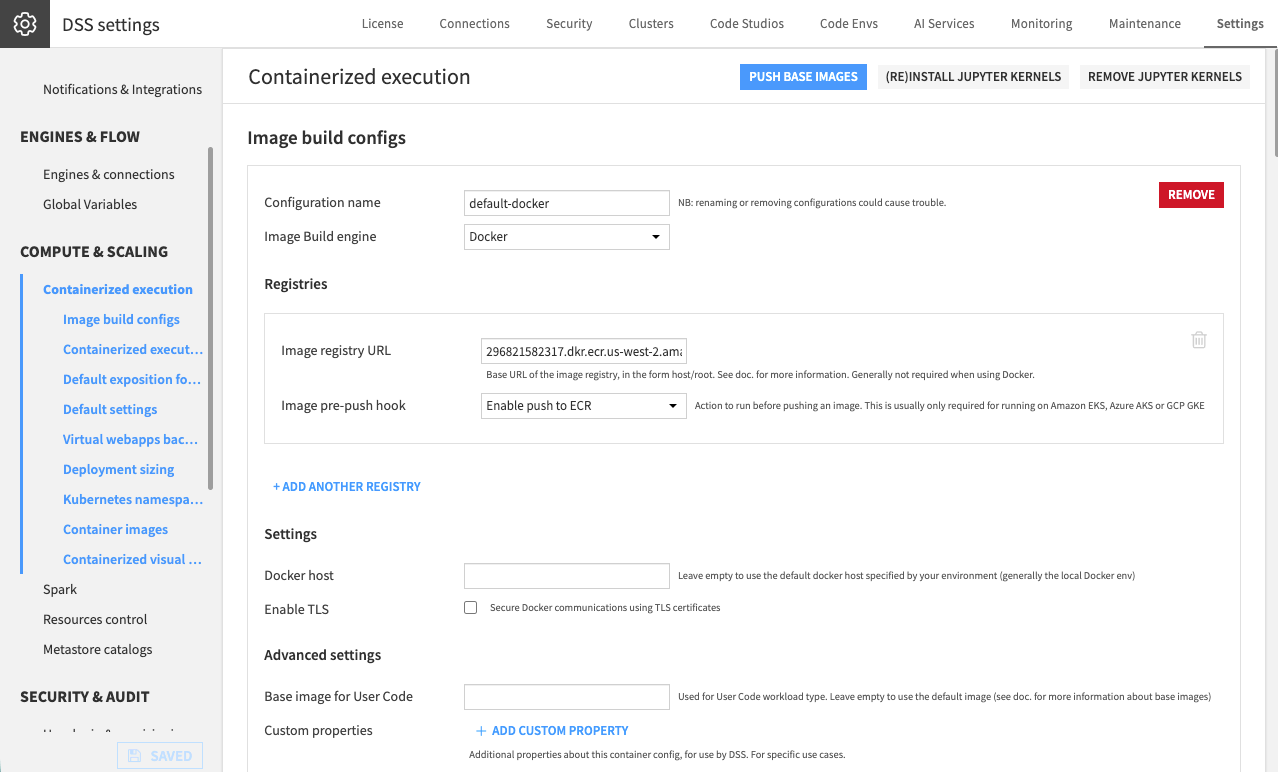
The image build config defines how the container image is built, the registry it’s pushed to, and, if that registry requires it, how to authenticate before pushing. A container configuration points to one image build config, so several configurations can share the same images.
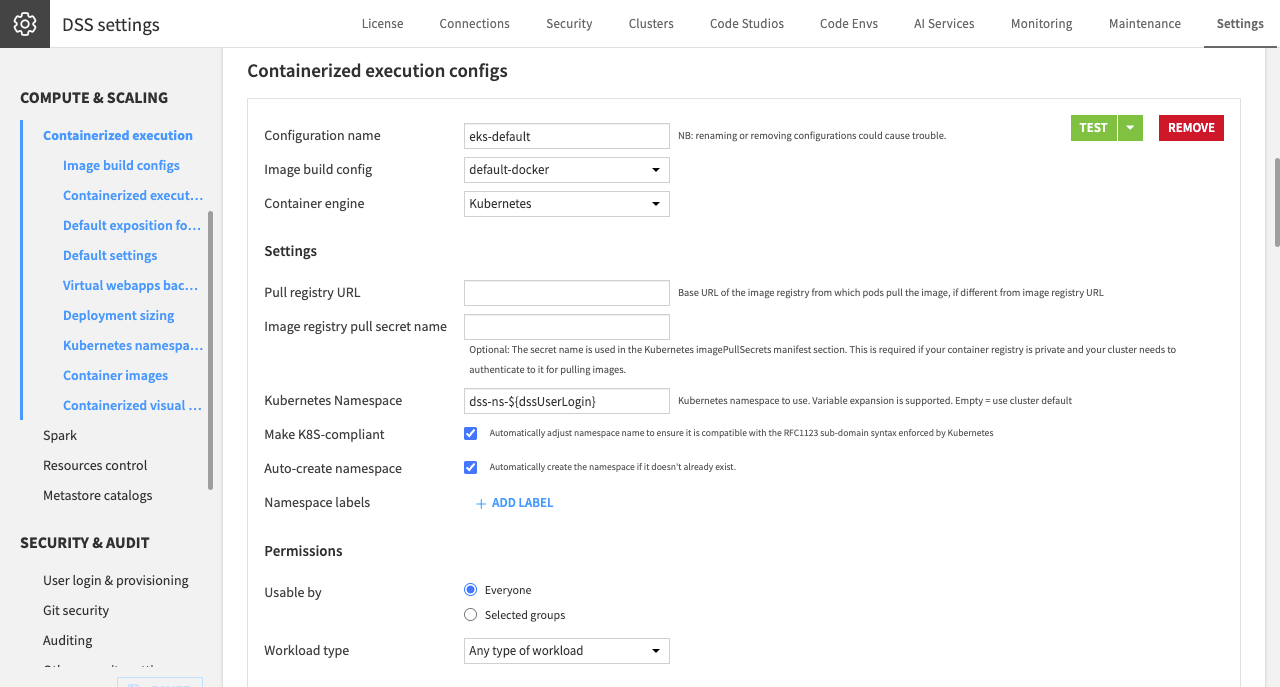
The containerized execution config itself sets the pull registry and an optional pull secret, so the cluster’s machines can authenticate when pulling a private image at runtime, and the Kubernetes namespace the work runs in. A common pattern gives each user their own namespace, created automatically, so one user’s work is isolated from another’s.
Note
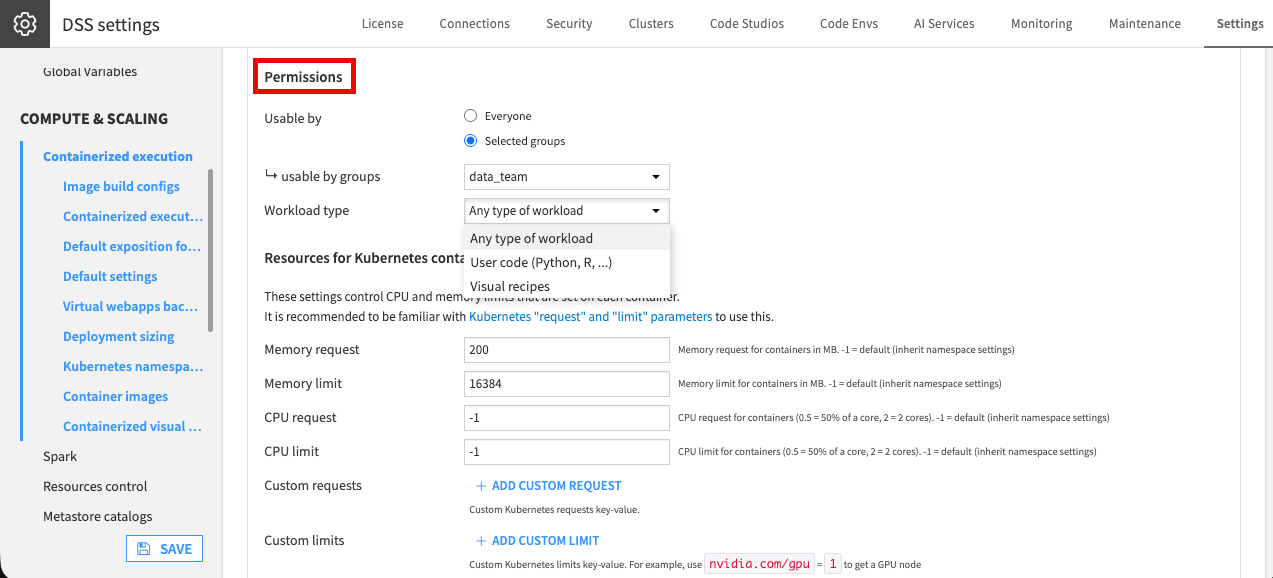
A configuration can also be scoped to a workload type: any workload, only user code, or only visual recipes. This lets you route different kinds of work to different configurations, for example a lean configuration for visual recipes and a larger one for notebooks.
Sizing and placement#
Beyond the image and namespace, the same configuration decides how large each workload can be and where on the cluster it lands:
Requests and limits set how much CPU and memory a workload asks for, and the ceiling it may not exceed. This is what protects a shared cluster from a single runaway job.
A custom limit requests specialized hardware. For example,
nvidia.com/gpu = 1asks for a GPU node.Placement rules, mainly node selectors and tolerations, send the work to the right machines: for example, keeping GPU work on GPU nodes.
A GPU configuration is essentially a standard one, plus:
a GPU custom limit
a matching toleration
a code environment built with a GPU runtime
See also
A container configuration has more settings than this article covers. For the full reference, see Elastic AI computation.
Who can use a configuration#
Just as a cluster is a permissioned resource, so is each container configuration. Under its Permissions, a configuration is either usable by Everyone or restricted to Selected groups. This adds a finer level of control on top of cluster access levels: cluster access decides who can reach the cluster at all, while a configuration’s permissions decide who can use a particular one.
Tip
Let everyone use a modest default configuration, and reserve a large or GPU configuration for advanced coders. That way a few users can’t consume the whole cluster.
Code environments in containers#
The third piece of the triad is the code environment, which supplies the packages a workload needs. To make one available on the cluster, you enable it for a specific container configuration. Enabling it builds the environment locally and also layers it onto the container image and pushes it to the registry, so a recipe can use it on the cluster. Build an environment only for the configurations that need it, to avoid filling the registry with images no one uses.
Note
This applies to code workloads. Visual recipes can run in a container without a code environment, since they don’t execute user packages.
See also
The Code Environments course covers how to create, configure, secure, and maintain the code environments you enable here.
Next steps#
To configure containerized execution hands-on, see Tutorial | Configure containerized execution.