

Concept | Connection usage parameters and dataset placement#
Connections are the pathways an admin configures for Dataiku to reach external data. Once a connection exists, an admin has more decisions to take: what Dataiku can do with the source location, and where in that location Dataiku puts what its users create.
Two separate groups of settings answer those questions, and they sit in a hierarchy.
Setting |
Purpose |
|---|---|
Usage params |
“Allow write” and “Allow managed datasets (or knowledge banks)” are gates. They decide whether Dataiku can write an output to a source location at all. |
Rules for new datasets |
“Rules for new datasets” matters once those gates are open. These settings decide where an output lands in the source location. |
Managed vs. external datasets#
Making sense of “Allow managed datasets (or knowledge banks)” requires a quick definition first: what separates a managed dataset (or knowledge bank) from an external one?
An external dataset points at a table or file that already existed before Dataiku got involved. A DBA-managed production table is a typical example. A user can register that table as a dataset, and even use it as a recipe’s output, so Dataiku writes rows into it. But Dataiku doesn’t own it. It didn’t create the table, won’t drop it, and doesn’t treat the table’s schema as its own to change.
A managed dataset is different. When users build data pipelines, they create new datasets in the source location, with no pre-existing tables or files behind them. In this case, Dataiku “manages” these datasets. That means:
Dataiku creates the underlying table or file in the source location.
Dataiku changes its schema as users build the Flow.
Dataiku drops the dataset if a user deletes it.
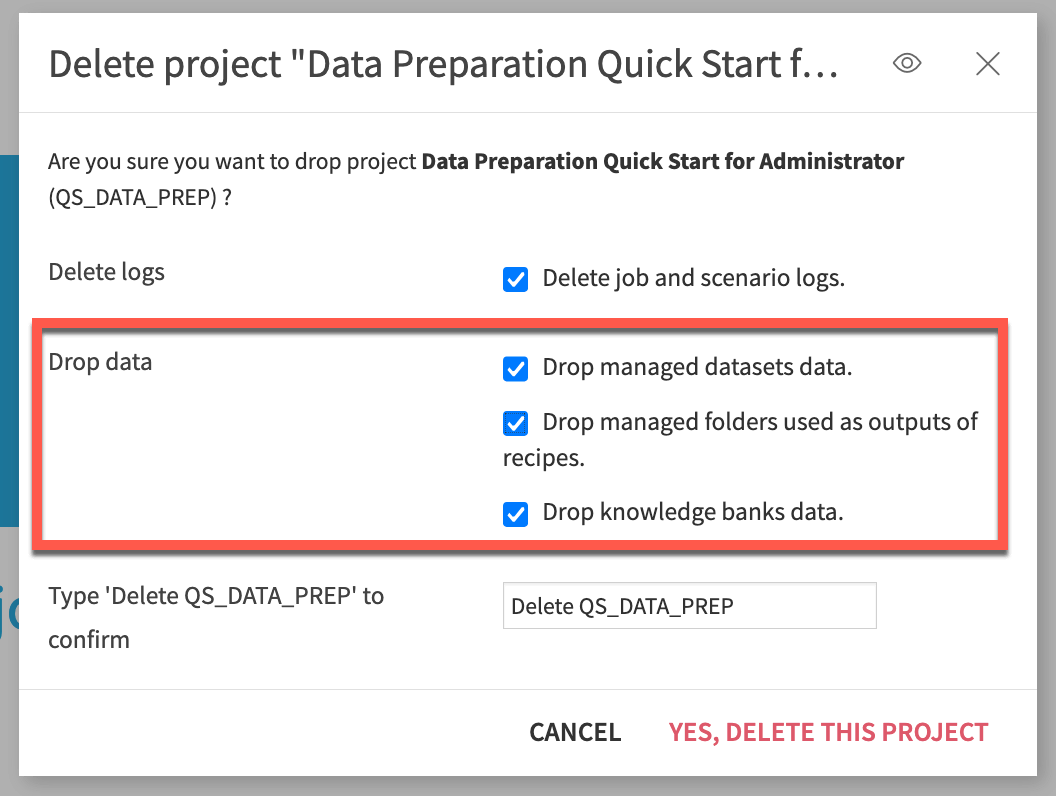
When deleting a Dataiku project, users can drop the data from managed datasets, folders, and knowledge banks so it’s no longer present in the source location.#
Usage params#
Take a closer look at a connection’s usage parameters.
Setting |
Controls |
|---|---|
Allow write |
Whether Dataiku can write any data to the connection at all. |
Allow managed datasets (or knowledge banks) |
Whether Dataiku can create new managed datasets (or knowledge banks) on the connection, as opposed to only working with objects that already exist there. |
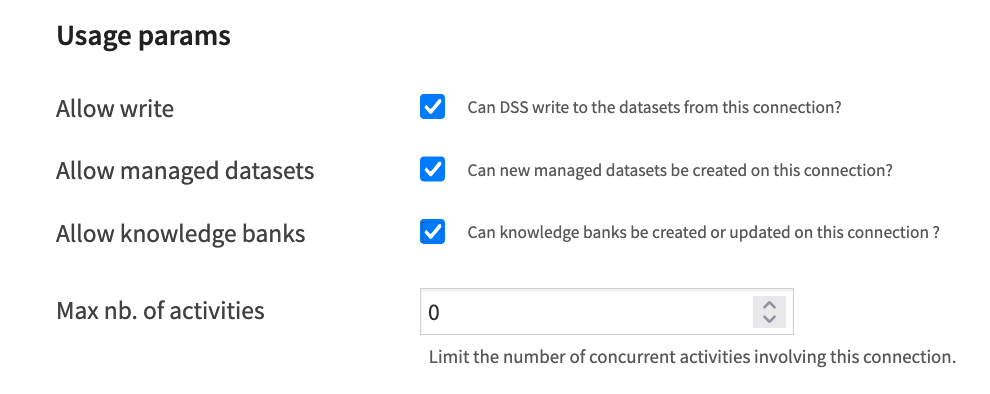
“Allow write” is the master switch. Turn it off, and it becomes a read-only connection. “Allow managed datasets” can’t override that. Creating a managed dataset means Dataiku creates and owns a table or file, and that act is itself a form of writing.
“Allow managed datasets” only matters, then, on a connection that already “Allows write.” It narrows what that write access is for.
With both settings on, users can build new managed outputs on the connection. This is the common case for a general-purpose working connection, one where Dataiku is expected to create and manage its own tables as Flows grow.
With “Allow write” on and “Allow managed datasets” off, users can still write to the connection, but only into datasets that already exist there. Dataiku won’t spawn new managed tables on its own. This suits a connection to a shared or sensitive schema, where an admin wants to permit specific, expected write activity without letting every new Flow leave behind a table of its own.
Tip
Some connections may intentionally never accept writes. A connection to a production source system, or a shared reference dataset that other teams depend on, are common examples.
Rules for new datasets and relocation#
Toggling on the option to “Allow managed datasets” presents a new set of options, Rules for new datasets. If permitting managed datasets, the administrator’s next task is deciding where in the connection those tables should land and how they should be named.
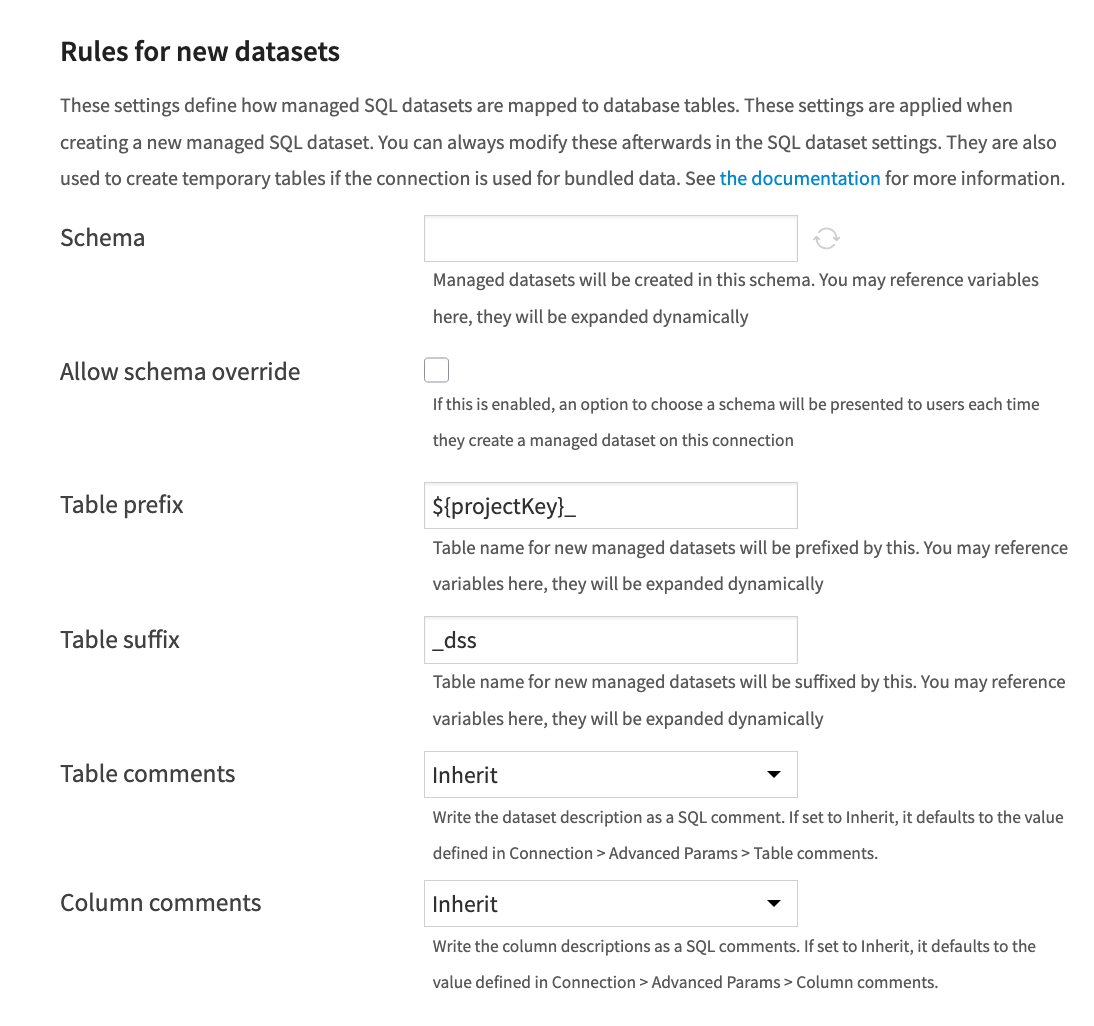
If these settings are empty, Dataiku names the table after the dataset itself and places it in the connection’s default schema. For example, a managed dataset called my_dataset becomes a table called my_dataset.
While that may be fine for a single project on a single connection, it breaks down once the connection is shared. A second project with its own my_dataset would collide with the first, each overwriting the other’s table. Duplicating a project, or importing one into a different instance, creates the same risk.
A relocatable managed dataset avoids this by building its table name, and optionally its schema, from variables instead of fixed values. The same dataset definition then produces a different table in every project.
When you create a new SQL connection, you may already find a table prefix set to ${projectKey}_. In this case, consider a dataset called my_dataset in a project with the key MY_PROJECT. The connection stores the table as MY_PROJECT_my_dataset. This eliminates the chance of colliding with a same-named dataset in another project on the same instance.
Note
On Dataiku Cloud, managed connections may also include the node’s ID in the prefix, such as ${NODE_DC}_${projectKey}_. NODE_DC is a global variable that Dataiku Cloud sets on each node: the node’s ID, prefixed with node_. You can find this ID in the node’s URL, right after dss-. For example, on a node at dss-1a2b3c4d-..., a dataset my_dataset in project MY_PROJECT is stored as the table node_1a2b3c4d_MY_PROJECT_my_dataset. The exact prefix varies by connection type.
An admin can extend this pattern further. Adding a suffix, such as _dss, is a common convention for database hygiene. A DBA can tell at a glance which tables came from Dataiku, and which project each one belongs to. With a prefix of ${projectKey}_ and a suffix of _dss, the same dataset in Dataiku becomes table MY_PROJECT_my_dataset_dss. From the perspective of the user building Flows, however, the dataset name appears as my_dataset.
Tip
It’s an administrator’s responsibility to configure these settings in the most optimal way for their organization. Consistent prefixes, suffixes, and schemas contribute to scaling an instance that meets user needs. On a large, busy instance, you may prefer to set ${projectKey}_ as the schema instead of the table prefix. Then, instead of having one shared schema, each project would have its own.
Important
Dataiku doesn’t create a schema that doesn’t already exist. If the schema setting relies on a variable like ${projectKey}_, the matching schema needs to exist in the database before a project builds its first managed dataset there.
Placement is also independent of permissions. Wherever a managed dataset lands, the connection’s credentials still need database-level privileges on that schema. Configuring “Rules for new datasets” tells Dataiku where to put a table; it doesn’t grant Dataiku the right to put one there.
These settings apply only to datasets Dataiku creates from that point forward. Changing them doesn’t rename or move tables Dataiku already created.
See also
Non-SQL connections support similar relocation settings for paths and Hive tables. See Making relocatable managed datasets for the full set of options by connection type.
Advanced JDBC properties and fetch size#
Beyond the settings above, an SQL connection exposes a couple of tuning levers. Advanced JDBC properties let an admin pass arbitrary key-value pairs straight through to the underlying JDBC driver. Fetch size controls how many rows Dataiku pulls from the database in a single batch when reading.
Neither setting changes what a connection is allowed to do, or where its datasets land. They exist to fine-tune how a connection performs once it’s already permitted to do its job. The valid keys for advanced properties, and the fetch size that makes sense for a given database, depend entirely on the driver and the workload.
See also
Advanced JDBC properties are driver-specific. Always consult the reference documentation on Connecting to data for the properties a given driver supports.
Next steps#
With “Allow write,” “Allow managed datasets,” and the relocation settings that keep managed datasets collision-free in mind, you’re ready to see these settings in practice. See Tutorial | Manage a connection between Dataiku and a data source to test these principles for yourself.
See also
Usage parameters and placement settings decide what a connection allows once someone reaches it. For how an admin controls who reaches it in the first place, see Concept | Connection security.