

Concept | Instance-level governance settings#
The items appearing in the Govern node’s Governable items and registry pages come from synced metadata of connected Dataiku nodes. At the level of an enterprise however, this could mean thousands of AI assets potentially in need of governance.
To manage this volume, the Govern node administrator can control which items appear on these pages by defining instance-level governance settings. For example, depending on the needs of the organization, an administrator could do some combination of the following:
Before an item reaches an end user’s page, the Govern node administrator may automatically hide certain kinds of items from view. End users never see these hidden items.
Alternatively, the administrator may automatically govern certain items, thereby bypassing the Governable items page.
An example configuration#
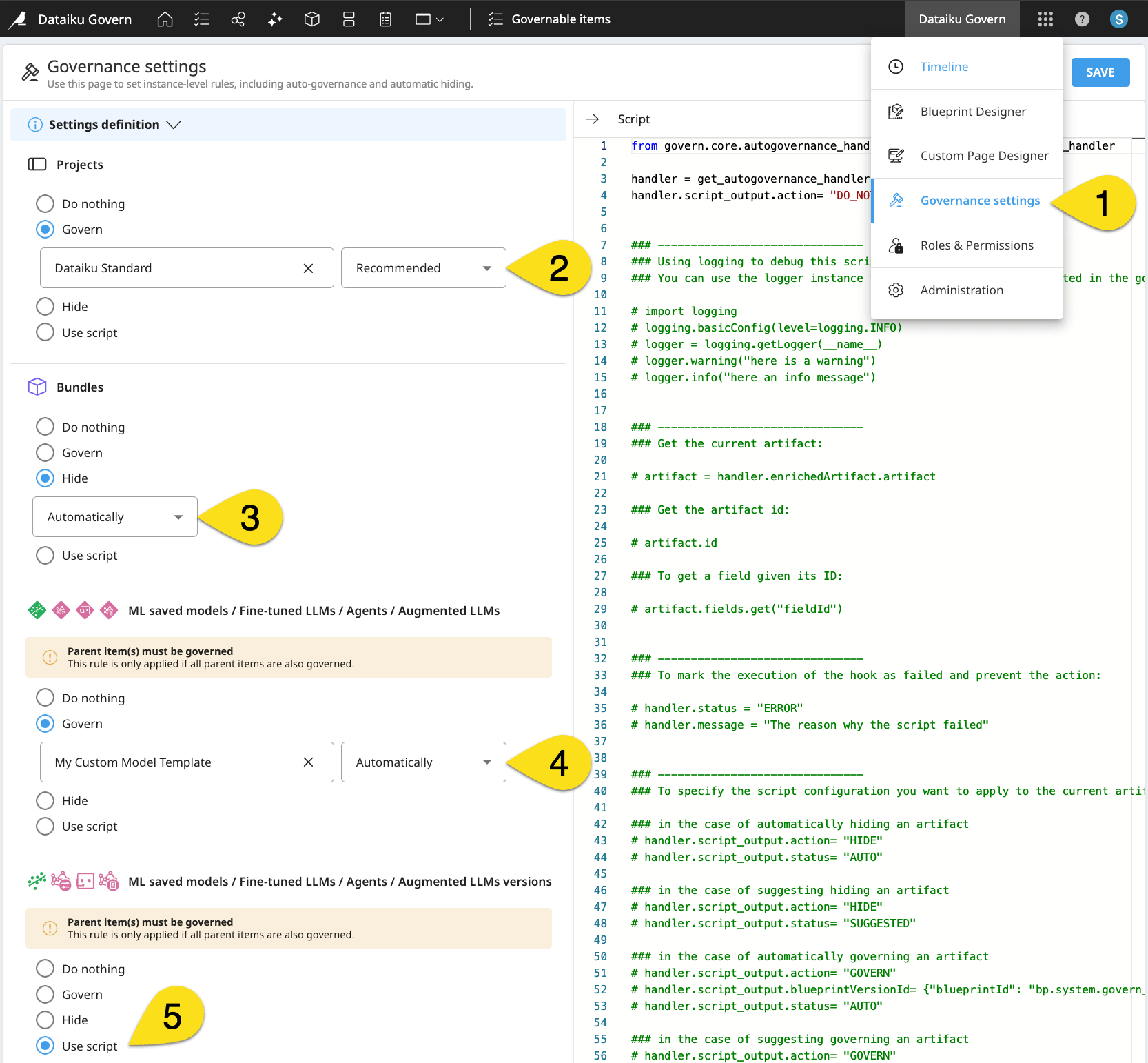
The following example demonstrates how specific settings impact the items displayed in the Governable items page and item registries. This walkthrough only suggests what’s possible. The settings most effective for your own organization will depend on your organization’s governance framework and objectives.
In all cases, the Govern node administrator defines these rules from the Governance settings page of the waffle menu (
 ).
).In this example, projects will have a recommendation to be governed according to the Dataiku Standard governance template. Under this setting, all projects appear in the Governable items page.
Bundles will be automatically hidden from end users. As a consequence, end users won’t find them in the Governable items page.
Models will be automatically governed according to a custom governance template. They too would be absent from the Governable items page (because they’re already governed).
Model versions will be governed according to a Python script. Their appearance in the Governable items or registry pages depends on the script’s behavior. For example, the script might automatically govern Dataiku projects having a certain tag or recommend hiding projects belonging to a certain folder.
Important
Custom templates and the ability to govern items according to a script are available only to holders of advanced licenses.
See also
Administrators defining these rules should consult Instance Governance settings in the reference documentation.
Next steps#
Pages like Governable items, item registries, and Governance settings include terminology like project, bundle, model, and model version. Before governing these items, take a step toward understanding the relationships between these item types in Concept | Item hierarchy in the Govern node.